
Flux 3 Image: Kontrolliere jeden Pixel
Verwandle Ideen in sorgfältig komponierte Visuals.
Erstelle Produktszenen, redaktionelle Layouts, Kampagnenvisuals und Charakterkompositionen mit den verfügbaren Bildmodellen. Featured-Quellbilder: Black Forest Labs.

Verifizierter Prompt
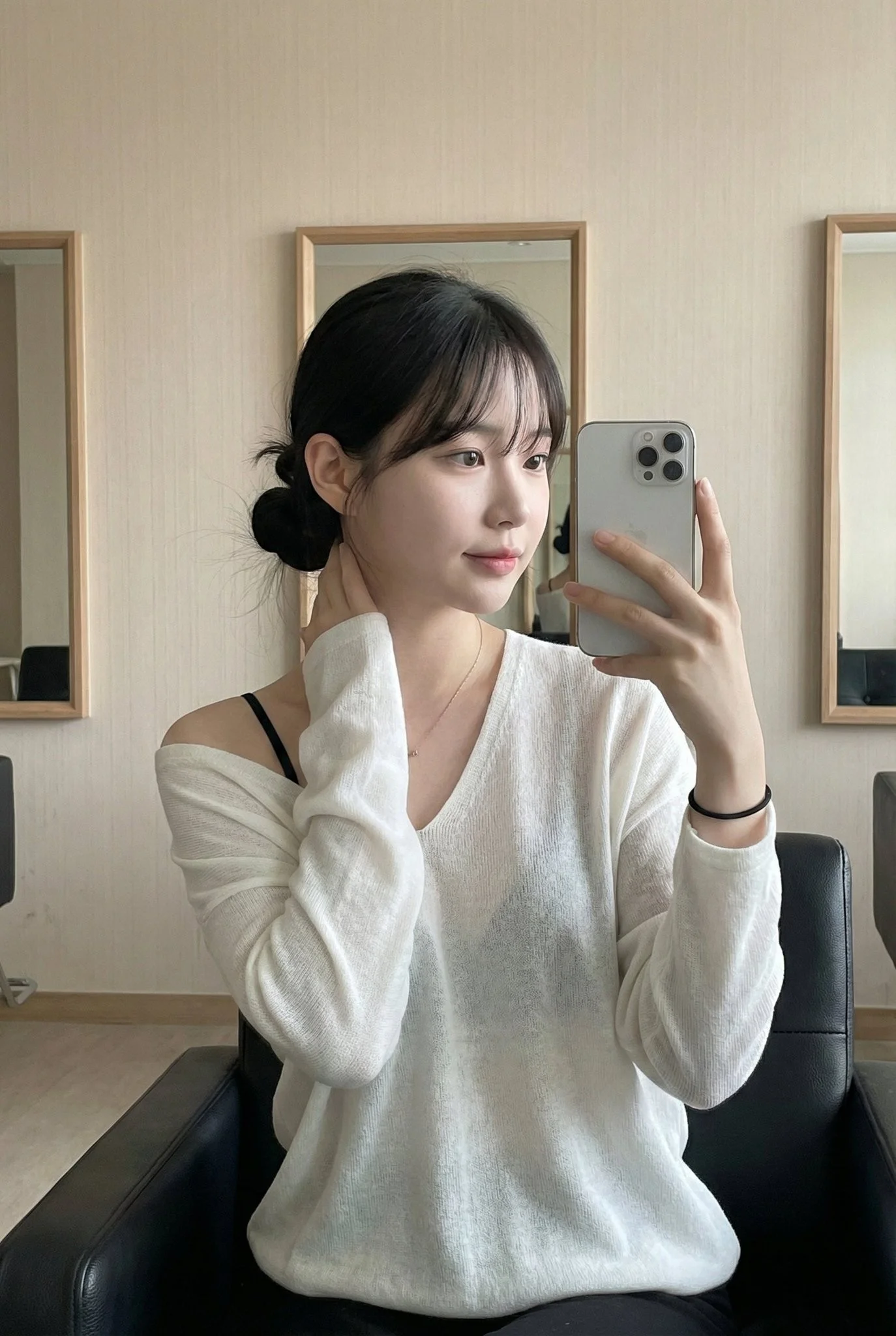
Overview: This photo captures a highly atmospheric indoor Mirror Selfie. It freezes a moment of a young Asian woman in a relaxed state, featuring a strong Pure and Desire style (Innocent yet alluring) and an authentic social media lifestyle vibe. Subject Features: Female, with fair complexion (cool porcelain skin). Her long black hair is tied back (into a low ponytail or bun), with air bangs framing her forehead and face. The makeup is exquisite yet natural, emphasizing reddish lips and a clear, translucent foundation. Expression and Mood: Her eyes are either dreamy or focused on the phone screen, with her head tilted slightly, conveying a sense of nonchalant elegance. Pose: Seated. She sits on a black leather chair, leaning back. Her right hand rests lazily behind her head/neck area, while her left hand holds the phone (silver iPhone) to take the mirror selfie. Outfit Details: The core visual point is the slouchy / effortlessly disheveled style. She wears a white deep V-neck long-sleeved top (the material looks soft, like modal or fine knit). The neckline slips off, revealing her collarbones, a large area of skin on her chest, and visible black thin bra straps, creating a classic black and white contrast and a hint of sexiness. Environment and Lighting: The background is very simple, featuring beige/grey wallpaper. The lighting is soft and even, resembling indoor natural light or softbox lighting, giving the skin a delicate texture. Vibe: Intimate, casual, the refined daily life of an urban woman, and a sense of relaxation.
Overview: This photo captures a highly atmospheric indoor Mirror Selfie. It freezes a moment of a young Asian woman in a relaxed state, featuring a strong Pure and Desire style (Innocent yet alluring) and an authentic social media lifestyle vibe. Subject Features: Female, with fair complexion (cool porcelain skin). Her long black hair is tied back (into a low ponytail or bun), with air bangs framing her forehead and face. The makeup is exquisite yet natural, emphasizing reddish lips and a clear, translucent foundation. Expression and Mood: Her eyes are either dreamy or focused on the phone screen, with her head tilted slightly, conveying a sense of nonchalant elegance. Pose: Seated. She sits on a black leather chair, leaning back. Her right hand rests lazily behind her head/neck area, while her left hand holds the phone (silver iPhone) to take the mirror selfie. Outfit Details: The core visual point is the slouchy / effortlessly disheveled style. She wears a white deep V-neck long-sleeved top (the material looks soft, like modal or fine knit). The neckline slips off, revealing her collarbones, a large area of skin on her chest, and visible black thin bra straps, creating a classic black and white contrast and a hint of sexiness. Environment and Lighting: The background is very simple, featuring beige/grey wallpaper. The lighting is soft and even, resembling indoor natural light or softbox lighting, giving the skin a delicate texture. Vibe: Intimate, casual, the refined daily life of an urban woman, and a sense of relaxation.
Verifizierter Prompt
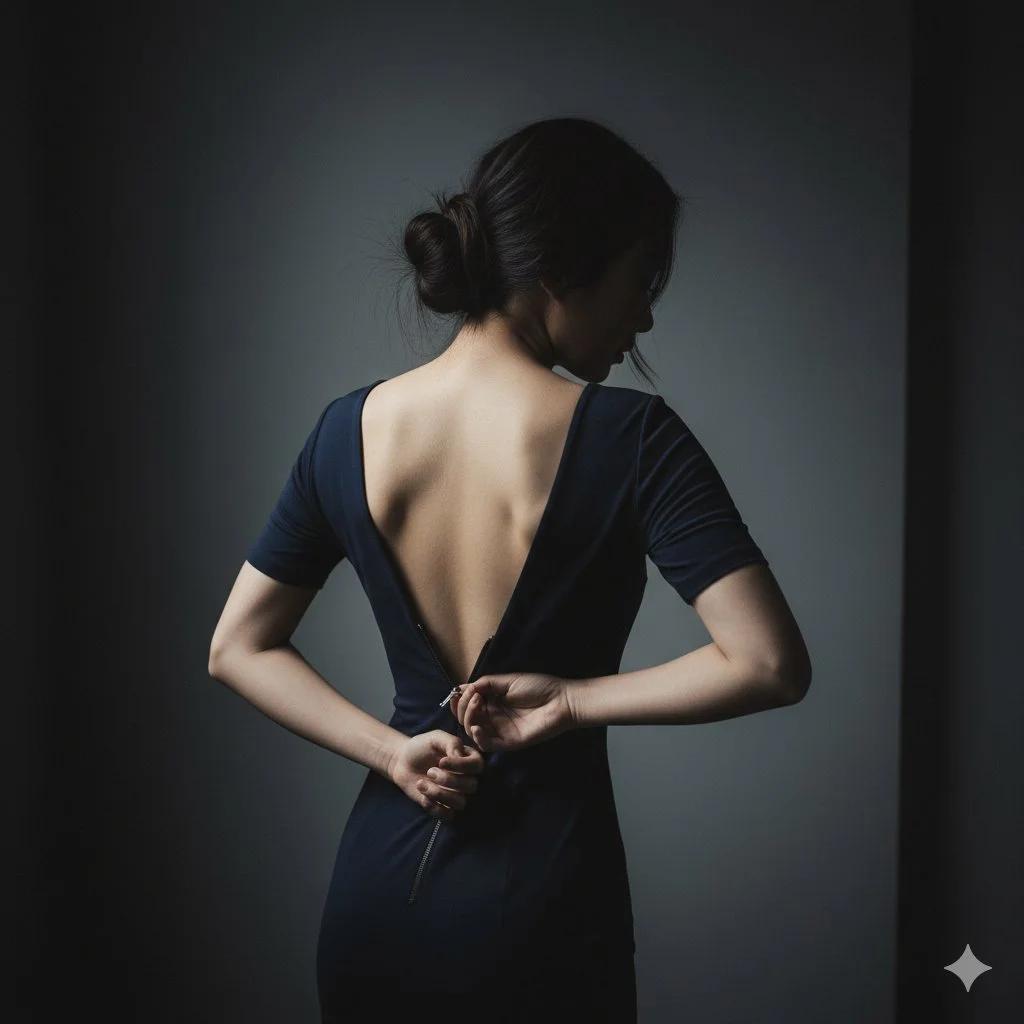
{ "scene": { "location": "A minimalist, dark bedroom or dressing room", "background": "A simple, dark grey wall, out of focus" }, "subject": { "age": "adult", "description": "East Asian woman, elegant, hair in a loose bun with stray strands", "wardrobe": "A simple, dark-colored (e.g., black, navy) form-fitting dress", "accessories": "None", "pose": "Shot from behind, three-quarter view. Her own hand is reaching back, pulling the zipper down (e.g., to the middle of her back).", "expression": "(Face mostly obscured or in profile) Subtle, mysterious, ambiguous", "gaze": "Looking down at her hand or away from camera", "body_notes": "Photorealistic, realistic adult proportions; realistic hand and skin texture on back" }, "camera": { "sensor": "full_frame", "focal_length_mm": 100, "aperture_f": 2.8, "shutter_s": 0.01, "iso": 400, "white_balance_k": 4500, "distance_m": 2.0, "camera_height_m": 1.6, "framing": "Tight medium shot (head to waist), focusing on the hand, zipper, and back", "focus": "Manual focus on the hand and zipper" }, "lighting": { "key": "Dramatic side light (gridded strip light) to highlight the hand and spine", "fill": "Deep shadows, very low fill", "hair": "Subtle rim light", "notes": "Low-key, high-contrast, "storytelling" image" }, "color_grade": { "style": "Cinematic, moody, ambiguous", "palette": "Desaturated, cool tones, blacks, skin tones", "contrast": "High, "chiaroscuro"", "saturation": "Low" }, "makeup": { "eyes": "(Not visible)", "cheeks": "(Not visible)", "lips": "(Not visible)" }, "postprocess": { "retouch": "Maintain natural skin texture, add film grain", "clarity": "High clarity on the zipper and hand", "dodge_burn": "Dodge on the spine, hand, and zipper pull", "vignette": "Strong dark vignette" }, "art_direction": { "mood": "Sensual, ambiguous, mysterious, intimate, quiet", "keywords": ["photorealistic", "sensual", "ambiguous", "zipper", "low-key", "cinematic", "intimate"] }, "negative_prompts": [ "nsfw", "underage look", "text or logos", "plastic doll skin", "cg", "3d render", "anime", "warped hands", "extra fingers", "deformed limbs" ] }
{ "scene": { "location": "A minimalist, dark bedroom or dressing room", "background": "A simple, dark grey wall, out of focus" }, "subject": { "age": "adult", "description": "East Asian woman, elegant, hair in a loose bun with stray strands", "wardrobe": "A simple, dark-colored (e.g., black, navy) form-fitting dress", "accessories": "None", "pose": "Shot from behind, three-quarter view. Her own hand is reaching back, pulling the zipper down (e.g., to the middle of her back).", "expression": "(Face mostly obscured or in profile) Subtle, mysterious, ambiguous", "gaze": "Looking down at her hand or away from camera", "body_notes": "Photorealistic, realistic adult proportions; realistic hand and skin texture on back" }, "camera": { "sensor": "full_frame", "focal_length_mm": 100, "aperture_f": 2.8, "shutter_s": 0.01, "iso": 400, "white_balance_k": 4500, "distance_m": 2.0, "camera_height_m": 1.6, "framing": "Tight medium shot (head to waist), focusing on the hand, zipper, and back", "focus": "Manual focus on the hand and zipper" }, "lighting": { "key": "Dramatic side light (gridded strip light) to highlight the hand and spine", "fill": "Deep shadows, very low fill", "hair": "Subtle rim light", "notes": "Low-key, high-contrast, "storytelling" image" }, "color_grade": { "style": "Cinematic, moody, ambiguous", "palette": "Desaturated, cool tones, blacks, skin tones", "contrast": "High, "chiaroscuro"", "saturation": "Low" }, "makeup": { "eyes": "(Not visible)", "cheeks": "(Not visible)", "lips": "(Not visible)" }, "postprocess": { "retouch": "Maintain natural skin texture, add film grain", "clarity": "High clarity on the zipper and hand", "dodge_burn": "Dodge on the spine, hand, and zipper pull", "vignette": "Strong dark vignette" }, "art_direction": { "mood": "Sensual, ambiguous, mysterious, intimate, quiet", "keywords": ["photorealistic", "sensual", "ambiguous", "zipper", "low-key", "cinematic", "intimate"] }, "negative_prompts": [ "nsfw", "underage look", "text or logos", "plastic doll skin", "cg", "3d render", "anime", "warped hands", "extra fingers", "deformed limbs" ] }
Verifizierter Prompt
Verifizierter Prompt
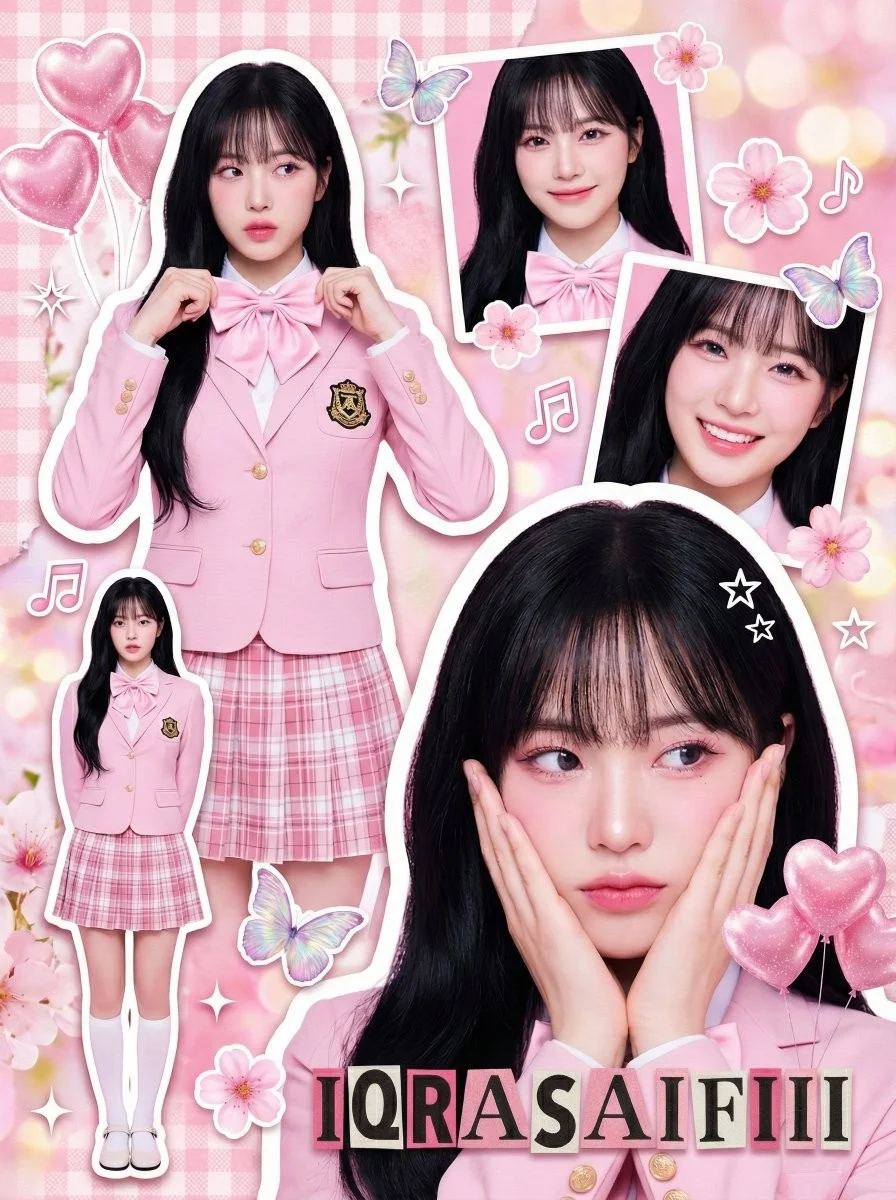
A crowded, vibrant composition featuring multiple photographic cutouts of the same subject layered over a textured pink background. White sticker outlines around the subject cuts, sparkle effects, floating graphics, and ransom-note style text. Young Asian woman (K-pop idol visual), fair porcelain skin. Long, voluminous jet-black hair with air bangs. Pink-toned douyin makeup: gradient pink lips, heavy pink blush, glitter eyeshadow. Outfit: Pastel pink fitted blazer with gold school crest emblem, white button-up shirt, large pink satin bow tie, pink and white plaid pleated mini skirt, white knee-high socks, white Mary Jane shoes. Multiple poses: flower pose with hands on cheeks, adjusting bow tie, full body standing, headshot smiling.
A crowded, vibrant composition featuring multiple photographic cutouts of the same subject layered over a textured pink background. White sticker outlines around the subject cuts, sparkle effects, floating graphics, and ransom-note style text. Young Asian woman (K-pop idol visual), fair porcelain skin. Long, voluminous jet-black hair with air bangs. Pink-toned douyin makeup: gradient pink lips, heavy pink blush, glitter eyeshadow. Outfit: Pastel pink fitted blazer with gold school crest emblem, white button-up shirt, large pink satin bow tie, pink and white plaid pleated mini skirt, white knee-high socks, white Mary Jane shoes. Multiple poses: flower pose with hands on cheeks, adjusting bow tie, full body standing, headshot smiling.
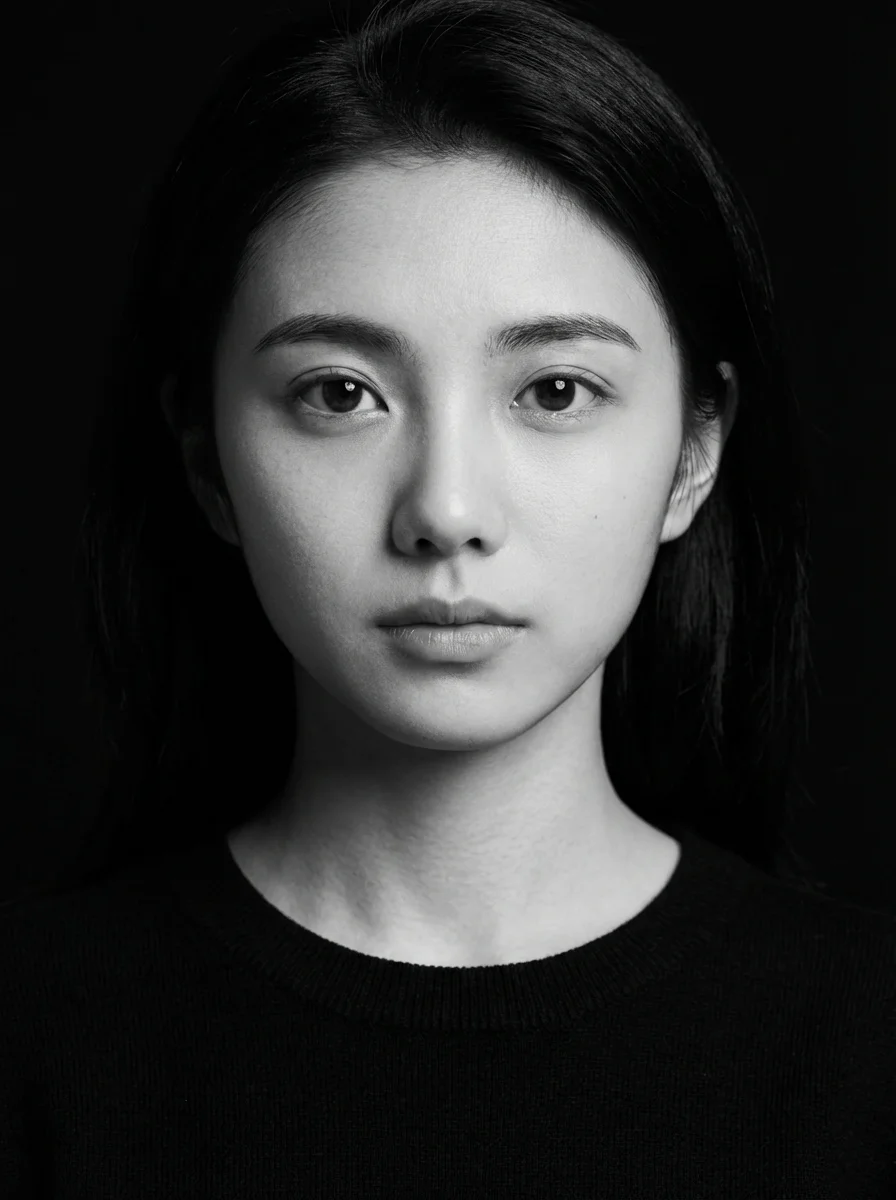
Verifizierter Prompt
k and white studio portrait of the young woman in the uploaded image, looking directly into the camera with a calm, neutral expression. She is wearing a plain black crew-neck sweater. Deep black background with hard-edged studio lighting from the left, crisp facial shadows, sharp highlights on cheekbones, ultra-detailed skin texture, photorealistic, captured with an 85mm lens. 3:4 aspect ratio.
k and white studio portrait of the young woman in the uploaded image, looking directly into the camera with a calm, neutral expression. She is wearing a plain black crew-neck sweater. Deep black background with hard-edged studio lighting from the left, crisp facial shadows, sharp highlights on cheekbones, ultra-detailed skin texture, photorealistic, captured with an 85mm lens. 3:4 aspect ratio.
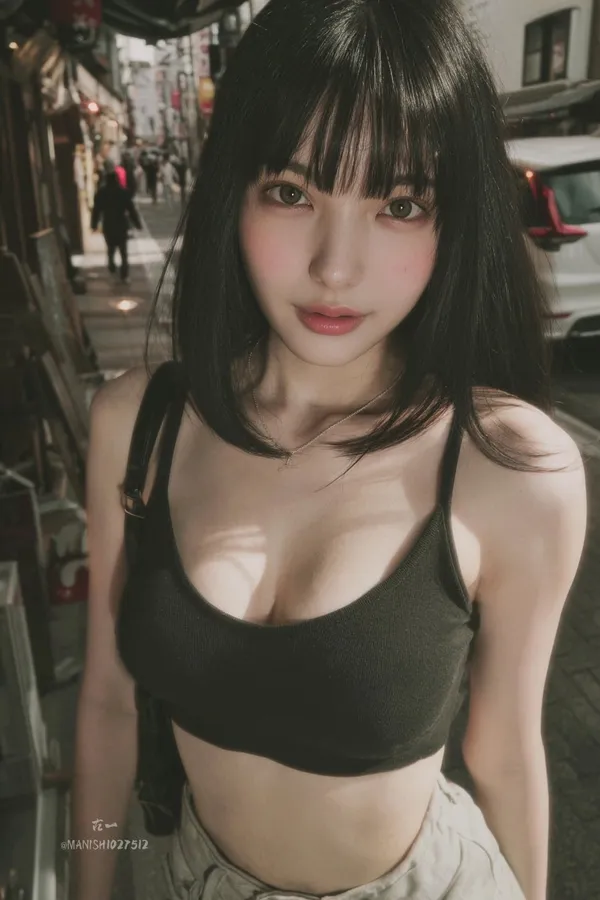
Verifizierter Prompt
ndid snapshot of a young woman with straight black hair, blunt bangs, large expressive eyes, and fair skin, standing casually in a bustling Tokyo street, wearing a low-cut crop top and high-waisted shorts, slight motion blur on the edges, natural daylight filtering through buildings, captured as if from a hidden angle with a smartphone camera.
ndid snapshot of a young woman with straight black hair, blunt bangs, large expressive eyes, and fair skin, standing casually in a bustling Tokyo street, wearing a low-cut crop top and high-waisted shorts, slight motion blur on the edges, natural daylight filtering through buildings, captured as if from a hidden angle with a smartphone camera.
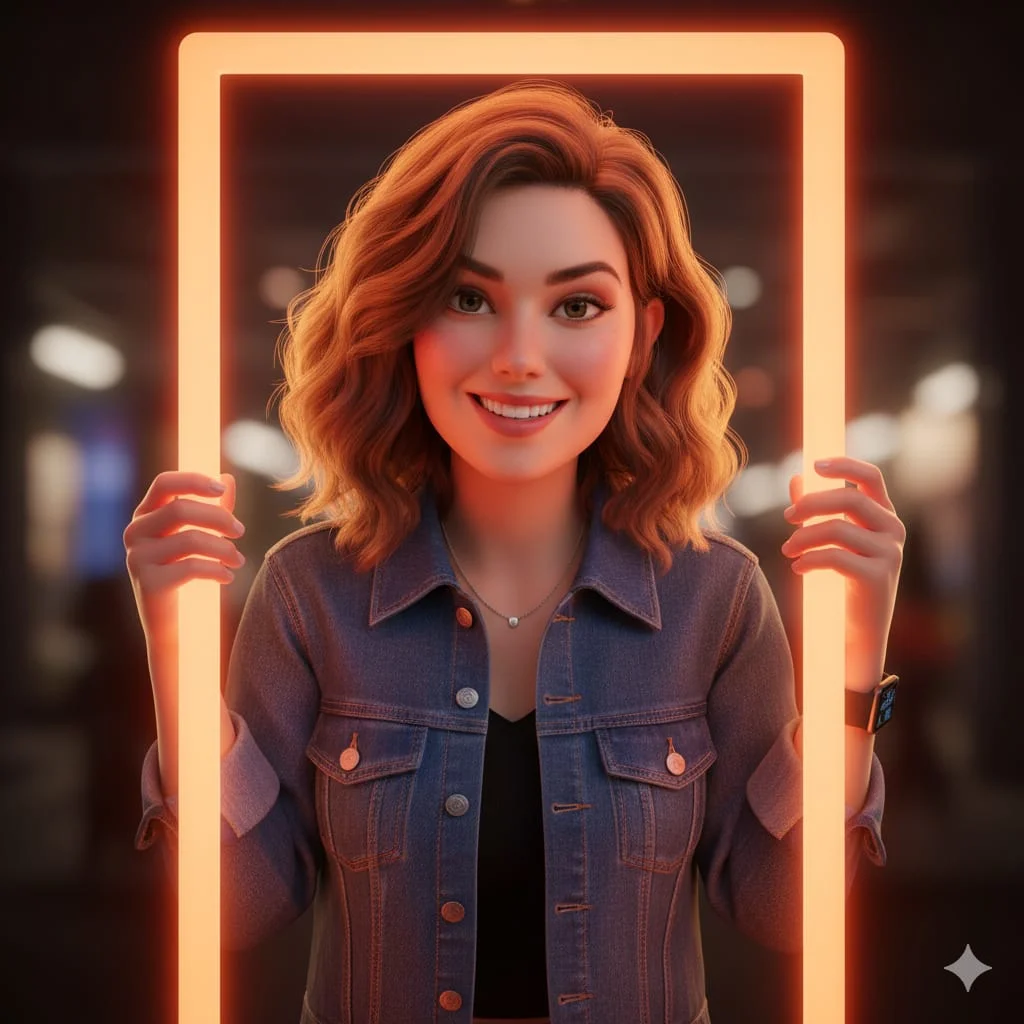
Verifizierter Prompt
A hyper-realistic 3D digital illustration of a woman with her natural facial features, hairstyle, and skin tone unchanged, styled in a Pixar-inspired cinematic look. She is smiling warmly while leaning through a glowing orange rectangular frame, both hands gently holding the edge of the frame. She wears a denim jacket layered over a black top, subtle jewelry, and a smartwatch on her wrist. The lighting is soft yet vibrant, highlighting facial depth, realistic fabric texture, and warm glow reflections on her face and hands. The background is softly blurred, creating a cinematic atmosphere with a perfect blend of realism, warmth, and Pixar-style charm.
A hyper-realistic 3D digital illustration of a woman with her natural facial features, hairstyle, and skin tone unchanged, styled in a Pixar-inspired cinematic look. She is smiling warmly while leaning through a glowing orange rectangular frame, both hands gently holding the edge of the frame. She wears a denim jacket layered over a black top, subtle jewelry, and a smartwatch on her wrist. The lighting is soft yet vibrant, highlighting facial depth, realistic fabric texture, and warm glow reflections on her face and hands. The background is softly blurred, creating a cinematic atmosphere with a perfect blend of realism, warmth, and Pixar-style charm.
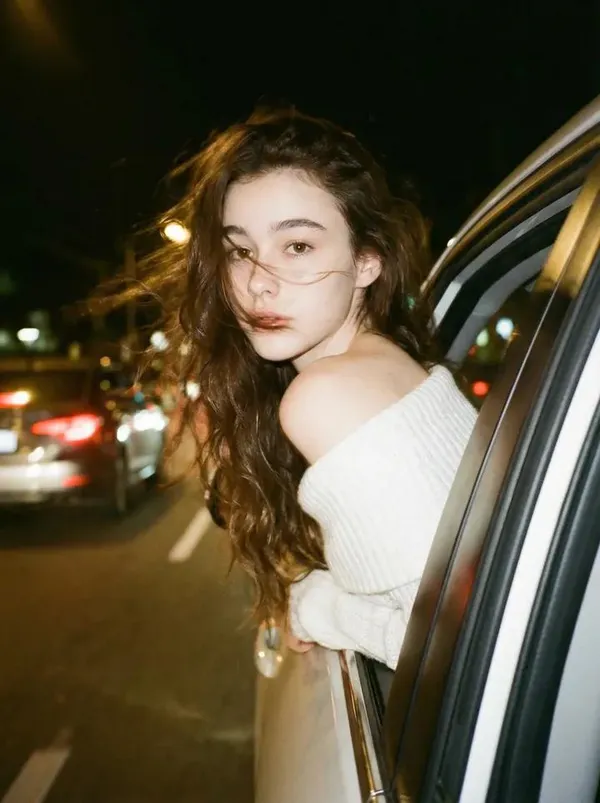
Verifizierter Prompt
te a photo of me 240 leaning my back out the window car like a dark dreamy blurry vintage windy night wearing a off shoulder white knitted top. With brown long wavy hair. keep the facial details correctly. Please do not alter facial features and leave head positioning as is.
te a photo of me 240 leaning my back out the window car like a dark dreamy blurry vintage windy night wearing a off shoulder white knitted top. With brown long wavy hair. keep the facial details correctly. Please do not alter facial features and leave head positioning as is.
Verifizierter Prompt
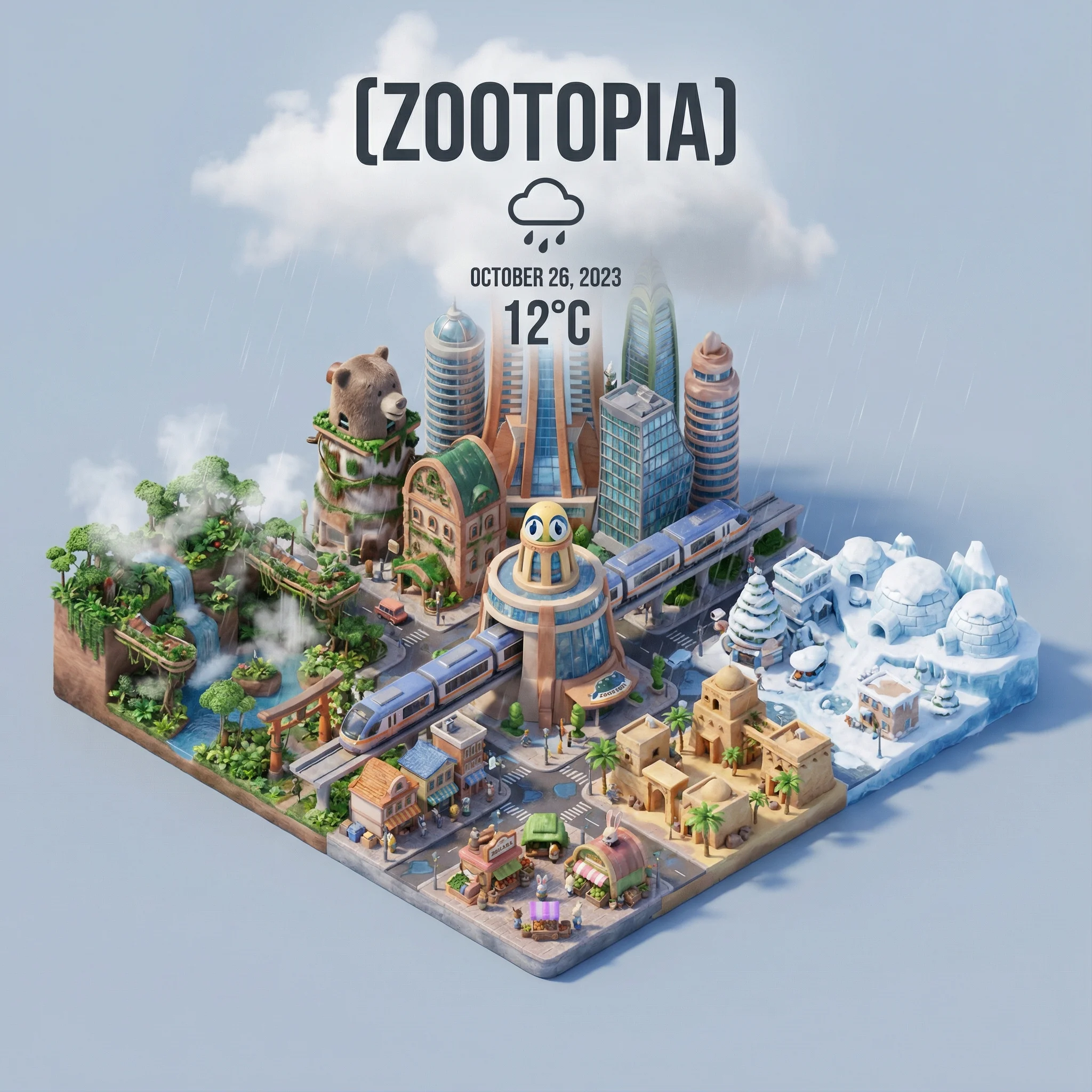
=xxx Present a clear, 45° top-down isometric miniature 3D cartoon scene of [CITY], featuring its most iconic landmarks and architectural elements. Use soft, refined textures with realistic PBR materials and gentle, lifelike lighting and shadows. Integrate the current weather conditions directly into the city environment to create an immersive atmospheric mood. Use a clean, minimalistic composition with a soft, solid-colored background. At the top-center, place the title “[CITY]” in large bold text, a prominent weather icon beneath it, then the date (small text) and temperature (medium text). All text must be centered with consistent spacing, and may subtly overlap the tops of the buildings. Square 1080x1080 dimension.
=xxx Present a clear, 45° top-down isometric miniature 3D cartoon scene of [CITY], featuring its most iconic landmarks and architectural elements. Use soft, refined textures with realistic PBR materials and gentle, lifelike lighting and shadows. Integrate the current weather conditions directly into the city environment to create an immersive atmospheric mood. Use a clean, minimalistic composition with a soft, solid-colored background. At the top-center, place the title “[CITY]” in large bold text, a prominent weather icon beneath it, then the date (small text) and temperature (medium text). All text must be centered with consistent spacing, and may subtly overlap the tops of the buildings. Square 1080x1080 dimension.
Verifizierter Prompt
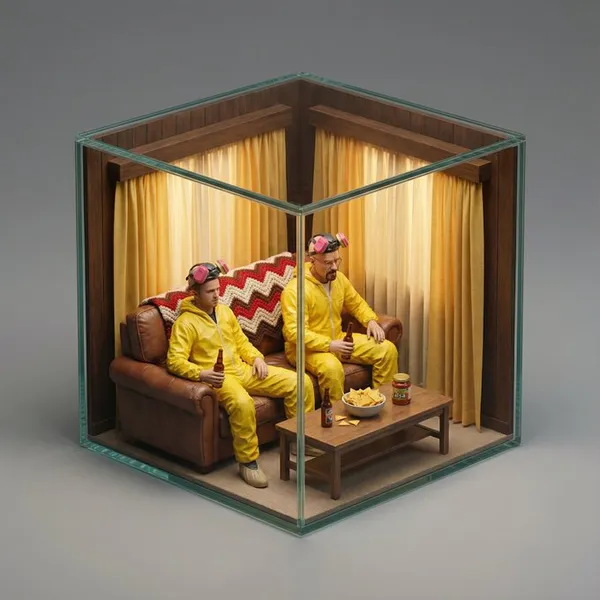
per-realistic isometric miniature diorama encased in a cubic enclosure. Structure: The cube features two solid back walls [describe the texture/material of the back walls, e.g., textured with brick, wood paneling, forest greenery, stone blocks] forming the [describe the setting type, e.g., urban backdrop, cozy room corner, dungeon cell], and two transparent glass front walls, creating a perfect cutaway view. The entire scene is strictly contained within this cube. Inside the cube is [SCENE DESCRIPTION: Describe the specific iconic movie scene environment. Mention key props, furniture, floor texture, and specific clutter that makes the scene recognizable]. Character: A photorealistic miniature person, representing [ACTOR NAME] as [CHARACTER NAME]. They are wearing [describe the iconic outfit/costume in detail]. The character is [ACTION: describe their pose/action, e.g., sitting, dancing, standing], with a [EXPRESSION] expression. [Optional: mention any specific hand-held props]. Materials & Textures: All elements feature hyper-realistic textures (e.g., [list 2-3 specific textures relevant to the scene, e.g., weathered wood, velvet fabric, rusted metal]). It looks like a masterfully crafted, museum-quality miniature model. Lighting: [ATMOSPHERE NAME]: [describe light sources and mood, e.g., warm golden sunlight, harsh fluorescent light, moody noir shadows], creating cinematic depth within the glass enclosure. Background: A clean, solid neutral grey background completely isolating the cube. No table texture, no blurred room surroundings, no external clutter. Camera: A detailed macro photograph from a slightly elevated isometric three-quarter view, centering on the front glass corner. High aperture to keep the entire miniature in focus.
per-realistic isometric miniature diorama encased in a cubic enclosure. Structure: The cube features two solid back walls [describe the texture/material of the back walls, e.g., textured with brick, wood paneling, forest greenery, stone blocks] forming the [describe the setting type, e.g., urban backdrop, cozy room corner, dungeon cell], and two transparent glass front walls, creating a perfect cutaway view. The entire scene is strictly contained within this cube. Inside the cube is [SCENE DESCRIPTION: Describe the specific iconic movie scene environment. Mention key props, furniture, floor texture, and specific clutter that makes the scene recognizable]. Character: A photorealistic miniature person, representing [ACTOR NAME] as [CHARACTER NAME]. They are wearing [describe the iconic outfit/costume in detail]. The character is [ACTION: describe their pose/action, e.g., sitting, dancing, standing], with a [EXPRESSION] expression. [Optional: mention any specific hand-held props]. Materials & Textures: All elements feature hyper-realistic textures (e.g., [list 2-3 specific textures relevant to the scene, e.g., weathered wood, velvet fabric, rusted metal]). It looks like a masterfully crafted, museum-quality miniature model. Lighting: [ATMOSPHERE NAME]: [describe light sources and mood, e.g., warm golden sunlight, harsh fluorescent light, moody noir shadows], creating cinematic depth within the glass enclosure. Background: A clean, solid neutral grey background completely isolating the cube. No table texture, no blurred room surroundings, no external clutter. Camera: A detailed macro photograph from a slightly elevated isometric three-quarter view, centering on the front glass corner. High aperture to keep the entire miniature in focus.
Verifizierter Prompt
Verifizierter Prompt
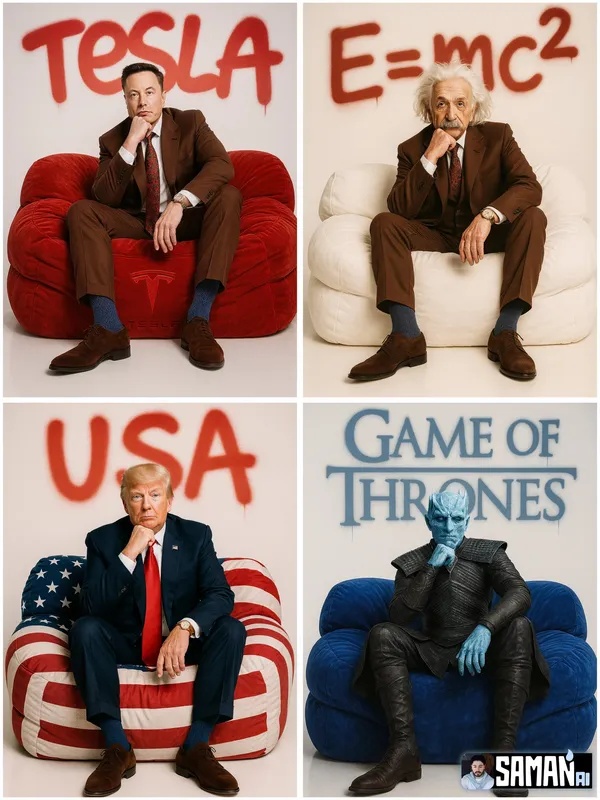
RACTER] sitting centered on an oversized puffy lounge sofa in [SOFA_COLOR], relaxed pose with one hand under chin, full-body. Clean white seamless studio, premium fashion-editorial lighting, hyper-real, minimal. Big spray-paint graffiti on the back wall reading “[TEXT]” with soft overspray and slight drips. 85mm look, crisp details, no clutter, no watermark. --ar 3:4
RACTER] sitting centered on an oversized puffy lounge sofa in [SOFA_COLOR], relaxed pose with one hand under chin, full-body. Clean white seamless studio, premium fashion-editorial lighting, hyper-real, minimal. Big spray-paint graffiti on the back wall reading “[TEXT]” with soft overspray and slight drips. 85mm look, crisp details, no clutter, no watermark. --ar 3:4
Erkunde Workflows zur Bilderstellung
Beginne mit einem visuellen Briefing, bearbeite ein Bild mit einem unterstützten Modell oder durchstöbere die Prompt-Showcase für Ideen.

Ein Bild-Workspace für dein nächstes kreatives Briefing
Flux 3 Image vereint Bildgenerierung, unterstützte Bildbearbeitung und Prompt-Beispiele in einem kreativen Workspace für Designer, E-Commerce-Teams und Marketer.
Beschreibe das Motiv, die Komposition, die Beleuchtung und den Stil. Wähle ein verfügbares Modell, prüfe die Credit-Kosten und untersuche dein Ergebnis im Verlauf.
Ein Bild erstellenVier Wege, eine visuelle Idee zu formen

Kampagnenvisuals mit klarer Komposition
Untersuche das Festivalplakat hinsichtlich seiner Anordnung von Bild, Farbe und Typografie. Definiere für deine eigene Kampagne den Fokuspunkt und lasse Platz für den finalen Text. Quellbeispiel: Black Forest Labs; dieses Bild wurde nicht auf dieser Website generiert.
Ein praktischer Workflow für Bildgenerierung und -bearbeitung
Erstelle ein fokussiertes Bild-Briefing und nutze die Steuerelemente, die dein ausgewähltes Modell bietet. Vergleiche das fertige Bild mit deiner beabsichtigten Komposition, bevor du entscheidest, was geändert werden soll.
Beschreibe das Bild, das du möchtest
Beginne mit einem Motiv, einer Umgebung, Beleuchtung, einem Kamerablickwinkel und einem Stil. Füge Layout-Anweisungen für eine Produktszene, ein Poster oder ein redaktionelles Bild hinzu, wenn sie wichtig sind.

Eine Referenz mitbringen, wenn unterstützt
Wähle ein bearbeitungsfähiges Modell und lade eine Referenz hoch, für die du die Berechtigung hast. Akzeptierte Dateitypen, Referenzlimits und Bearbeitungssteuerungen werden im Generator angezeigt.

Einstellungen und Credit-Kosten prüfen
Wähle ein verfügbares Seitenverhältnis und eine Auflösung. Prüfe die erforderlichen Credits vor dem Absenden; unterstützte Einstellungen und Kosten variieren je nach Modell.
Prompt-Ideen und veröffentlichte Beispiele entdecken
Durchsuche veröffentlichte Fälle in der Prompt-Showcase. Jeder Fall zeigt sein tatsächliches Modell und seinen Prompt, damit du das Ergebnis im Kontext studieren kannst.
Beschreiben, generieren, prüfen und verfeinern
Gehe von einem fokussierten Briefing zu einem geprüften Ergebnis über. Bewahre nützliche Versionen im Verlauf auf und passe jeweils eine Anweisung an.
Beschreibe dein visuelles Briefing
Schreibe Motiv, Umgebung, Komposition, Beleuchtung und Stil. Beschreibe für Überarbeitungen die Änderung und die Details, die du beibehalten möchtest.
Ein Modell wählen und generieren
Wähle aus den verfügbaren Bildmodellen, wähle unterstützte Einstellungen und prüfe die erforderlichen Credits. Füge Referenzen hinzu, wenn das Modell Bildbearbeitung unterstützt.
Dein Bild prüfen und herunterladen
Prüfe das fertige Bild im Verlauf. Kontrolliere Gesichter, Text, Produktdetails und die Gesamtkomposition, bevor du es herunterlädst oder veröffentlichst.
Die nächste Version verfeinern
Ändere einen Teil deines Prompts oder nutze unterstützte Bildbearbeitung. Vergleiche Versionen, damit du siehst, welche Richtung dein Briefing verbessert.
Bildideen für Designer, E-Commerce-Teams und Marketer
Verwandle eine konkrete visuelle Idee in Material für eine Kampagne, ein Produktkonzept, ein redaktionelles Layout oder eine kreative Präsentation. Prüfe jedes Ergebnis für den vorgesehenen Verwendungszweck.
Produktszenen
Beschreibe ein Produkt, seine Umgebung und Beleuchtung. Prüfe die generierte Form, Beschriftungen und Materialien gegen den realen Artikel, bevor du es in einem Listing verwendest.
Kampagnen-Visuals
Baue ein Kampagnenkonzept rund um eine Botschaft und einen klaren Blickpunkt auf. Lass Platz für die finale Typografie und prüfe Werbeaussagen vor der Veröffentlichung.
Redaktionelle Layouts
Erkunde Bildanordnungen für ein Cover, einen Artikel oder eine Präsentation. Gib Komposition und visuelle Hierarchie an; prüfe generierten Text separat.
Kreative Präsentationen
Nutze ein visuelles Konzept, um deinem Team eine Richtung zu vermitteln. Vergleiche Bildausschnitt, Farbpalette und Beleuchtung über Versionen hinweg.
Charakter-Kompositionen
Beschreibe einen Charakter, Kleidung, Ausdruck und Umgebung. Referenzverarbeitung und Konsistenz hängen vom Modell und den unterstützten Eingaben ab.
Bildüberarbeitungen
Nutze ein unterstütztes Bearbeitungsmodell für Änderungen an Farbe, Umgebung oder Details. Prüfe das gesamte Bild, um zu sehen, ob unbeabsichtigte Elemente geändert wurden.
Kreative Notizen für dein nächstes Bild
Gib dem Bild ein klares Motiv. Beschreibe die Umgebung und die Details, die das Briefing erkennbar machen.
Flux 3 Image: Fragen und Antworten
Das Generator-Menü zeigt die derzeit auf dieser Website verfügbaren Bildmodelle, einschließlich unterstützter Modelle der FLUX-Familie. Die Marke Flux 3 Image und hervorgehobene BFL-Quellbeispiele bedeuten nicht, dass eine FLUX.3-Generierung angeboten wird. Wähle das tatsächliche Modell, das im Menü angezeigt wird.
Die Generierung verbraucht Credits. Wähle ein Modell und unterstützte Einstellungen, um die erforderlichen Credits vor dem Absenden zu sehen. Besuche die Preisgestaltung für monatliche, jährliche und einmalige Optionen.
Verwende flux3 image in einem Desktop- oder Mobilbrowser, um Prompts zu schreiben, unterstützte Referenzen hinzuzufügen, den Verlauf zu prüfen und fertige Bilder herunterzuladen.
Beschreibe Motiv, Umgebung, Komposition, Beleuchtung und Stil. Füge präzise Details für Produktmaterialien, Kleidung oder Layout hinzu, wenn sie wichtig sind. Beschreibe für Bearbeitungen, was geändert werden soll.
Prompts, Referenzen und Ergebnisse können gespeichert werden, um Anfragen zu bearbeiten und den Verlauf bereitzustellen. Öffentliche Medienlinks können von anderen angesehen und geteilt werden. Lies die Datenschutzrichtlinie, bevor du sensibles Material hochlädst.
Das ausgewählte Modell bestimmt die Auflösungen, Seitenverhältnisse, Referenzlimits und Bearbeitungssteuerungen, die der Generator bietet. Verwende diese Steuerelemente; die Spezifikationen eines hervorgehobenen Quellbilds beschreiben nicht jedes verfügbare Modell.
Wähle ein bearbeitungsfähiges Modell, lade ein unterstütztes Bild hoch, für das du die Berechtigung hast, und beschreibe die Überarbeitung. Prüfe das Ergebnis, um sowohl deine angeforderte Änderung als auch die umliegenden Details zu kontrollieren.
Prüfe die geltenden Plattform- und Modellbedingungen für deinen vorgesehenen Verwendungszweck. Du bist verantwortlich für die Rechte an hochgeladenem Material, identifizierbaren Personen, Logos und anderen Inhalten Dritter.
Die Verarbeitungszeit variiert je nach Modell, Einstellungen, Anfrage und Serviceauslastung. Verfolge den Anfragestatus im Verlauf.
Nein. flux3 image ist ein unabhängiger Drittanbieter-Arbeitsbereich. Hervorgehobene Homepage-Bilder werden Black Forest Labs zugeschrieben und sind getrennt von nutzergenerierten Ergebnissen in der Prompt-Showcase. Original-Prompts werden nur aufgenommen, wenn sie verifiziert sind.
Weitere Artikel
Leitfäden zur Bilderstellung
Erstelle dein nächstes Bild
Beschreibe deine Idee, wähle ein verfügbares Bildmodell und prüfe die erforderlichen Credits. Prüfe und lade fertige Ergebnisse aus dem Verlauf herunter.