
Flux 3 Image: Kiểm soát từng pixel
Biến ý tưởng thành hình ảnh được bố cục chỉn chu.
Tạo cảnh sản phẩm, bố cục biên tập, hình ảnh chiến dịch và bố cục nhân vật với các mô hình hình ảnh khả dụng. Hình ảnh nguồn nổi bật: Black Forest Labs.

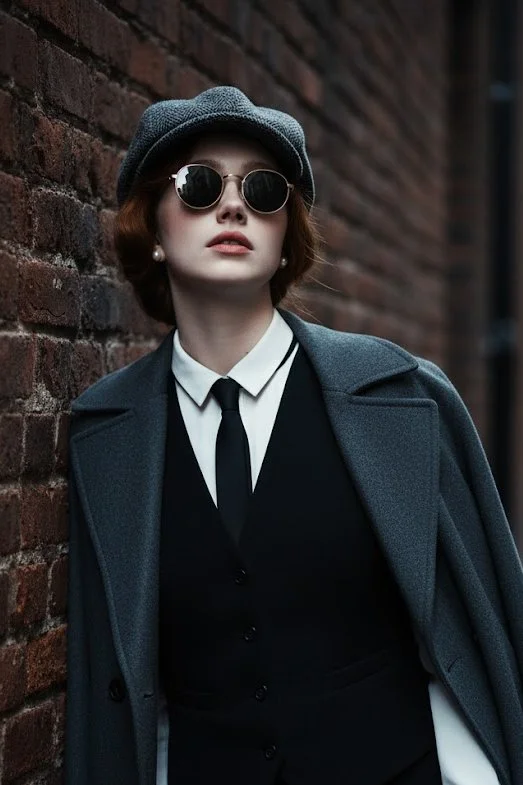
Prompt đã xác minh
Use 100% face above uploaded photo. A hyper-realistic, cinematic medium shot of a handsome man in his late 20s with black hair and black beard like uploaded photo, styled in the fashion of the 1920s. He wears a grey tweed newsboy cap, a black waistcoat over a crisp white shirt, a slim black tie, and black leather gloves. A heavy wool overcoat is draped over his shoulder. He leans against a weathered brick wall in a narrow, atmospheric alleyway, looking upwards with a cool, contemplative expression through his round sunglasses. The lighting is moody and dramatic, with cool tones and soft shadows creating a sense of depth and mystery. The photograph is ultra-detailed with sharp focus and a shallow depth of field.
Use 100% face above uploaded photo. A hyper-realistic, cinematic medium shot of a handsome man in his late 20s with black hair and black beard like uploaded photo, styled in the fashion of the 1920s. He wears a grey tweed newsboy cap, a black waistcoat over a crisp white shirt, a slim black tie, and black leather gloves. A heavy wool overcoat is draped over his shoulder. He leans against a weathered brick wall in a narrow, atmospheric alleyway, looking upwards with a cool, contemplative expression through his round sunglasses. The lighting is moody and dramatic, with cool tones and soft shadows creating a sense of depth and mystery. The photograph is ultra-detailed with sharp focus and a shallow depth of field.
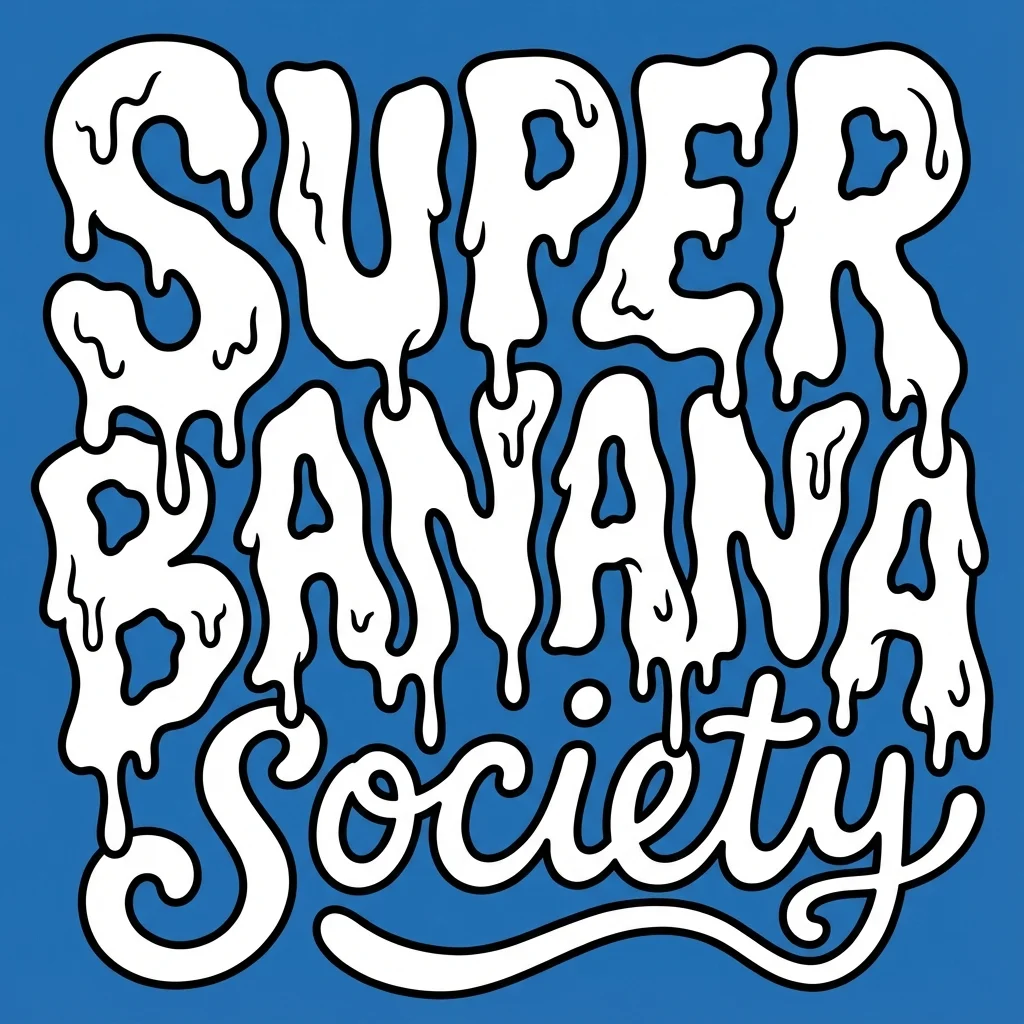
Prompt đã xác minh
te a bold, warped cartoon-style text design with two distinct layers. The top layer should say “SUPER GNARLY” in warped bubble letters with a melty, drippy texture, like ghost slime or goo. The letters should feel heavy and organic, with a slightly psychedelic or paranormal vibe. The bottom layer should say “SOCIETY” in much smaller, script-like or handwritten-style letters that tuck underneath or nestle between the larger title letters. Both layers should be solid white with thick black outlines. No gradients, shading, or texture. Layout should be playful and a little chaotic, but still readable. Vector friendly. Blue background. Square aspect ratio.
te a bold, warped cartoon-style text design with two distinct layers. The top layer should say “SUPER GNARLY” in warped bubble letters with a melty, drippy texture, like ghost slime or goo. The letters should feel heavy and organic, with a slightly psychedelic or paranormal vibe. The bottom layer should say “SOCIETY” in much smaller, script-like or handwritten-style letters that tuck underneath or nestle between the larger title letters. Both layers should be solid white with thick black outlines. No gradients, shading, or texture. Layout should be playful and a little chaotic, but still readable. Vector friendly. Blue background. Square aspect ratio.
Prompt đã xác minh
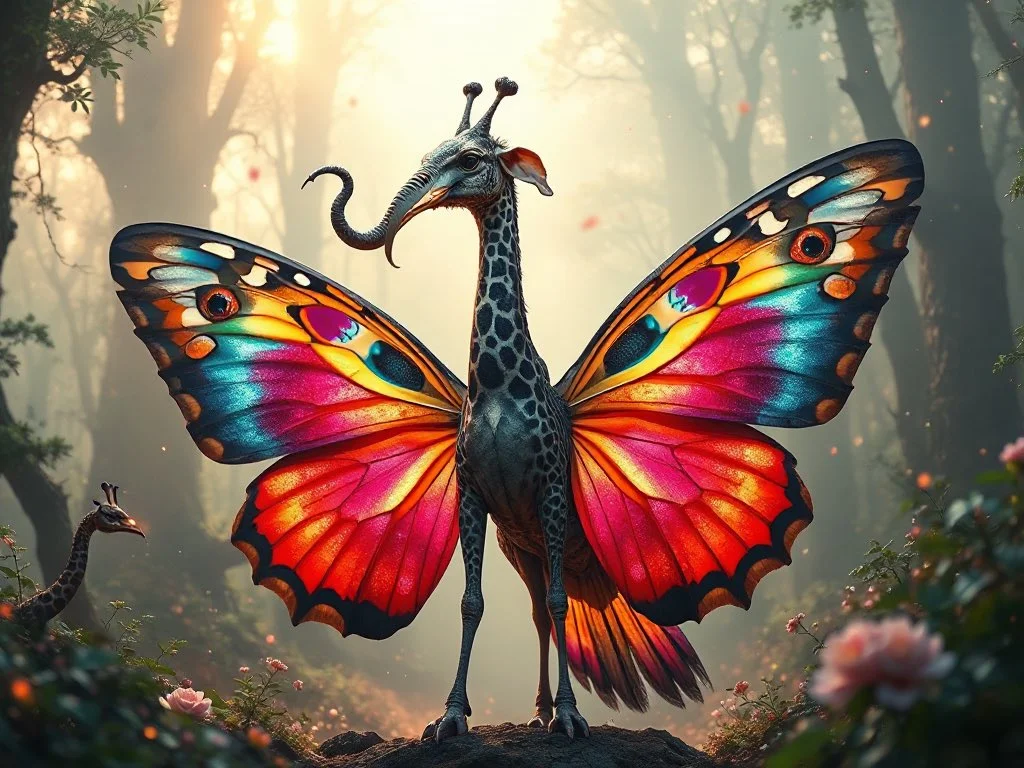
Prompt đã xác minh
A highly detailed and surreal depiction of a mythical bird creature. It has the elegant, colorful body of a butterfly, with vibrant symmetrical wing patterns. Its head is that of a majestic elephant, complete with large ears, a long curling trunk, and ivory tusks, giving it a powerful and ancient aura. A long, spotted giraffe neck connects the body and the head, rising high with grace. The wings are enormous eagle wings, fully extended with dramatic feathers in motion. Its tail is an iridescent peacock tail, fanned out in full display like royal plumage. The creature stands in an enchanted misty forest, bathed in ethereal light and surrounded by glowing particles. Ultra-realistic, cinematic lighting, fantasy atmosphere, hyper-detailed concept art
A highly detailed and surreal depiction of a mythical bird creature. It has the elegant, colorful body of a butterfly, with vibrant symmetrical wing patterns. Its head is that of a majestic elephant, complete with large ears, a long curling trunk, and ivory tusks, giving it a powerful and ancient aura. A long, spotted giraffe neck connects the body and the head, rising high with grace. The wings are enormous eagle wings, fully extended with dramatic feathers in motion. Its tail is an iridescent peacock tail, fanned out in full display like royal plumage. The creature stands in an enchanted misty forest, bathed in ethereal light and surrounded by glowing particles. Ultra-realistic, cinematic lighting, fantasy atmosphere, hyper-detailed concept art
Prompt đã xác minh
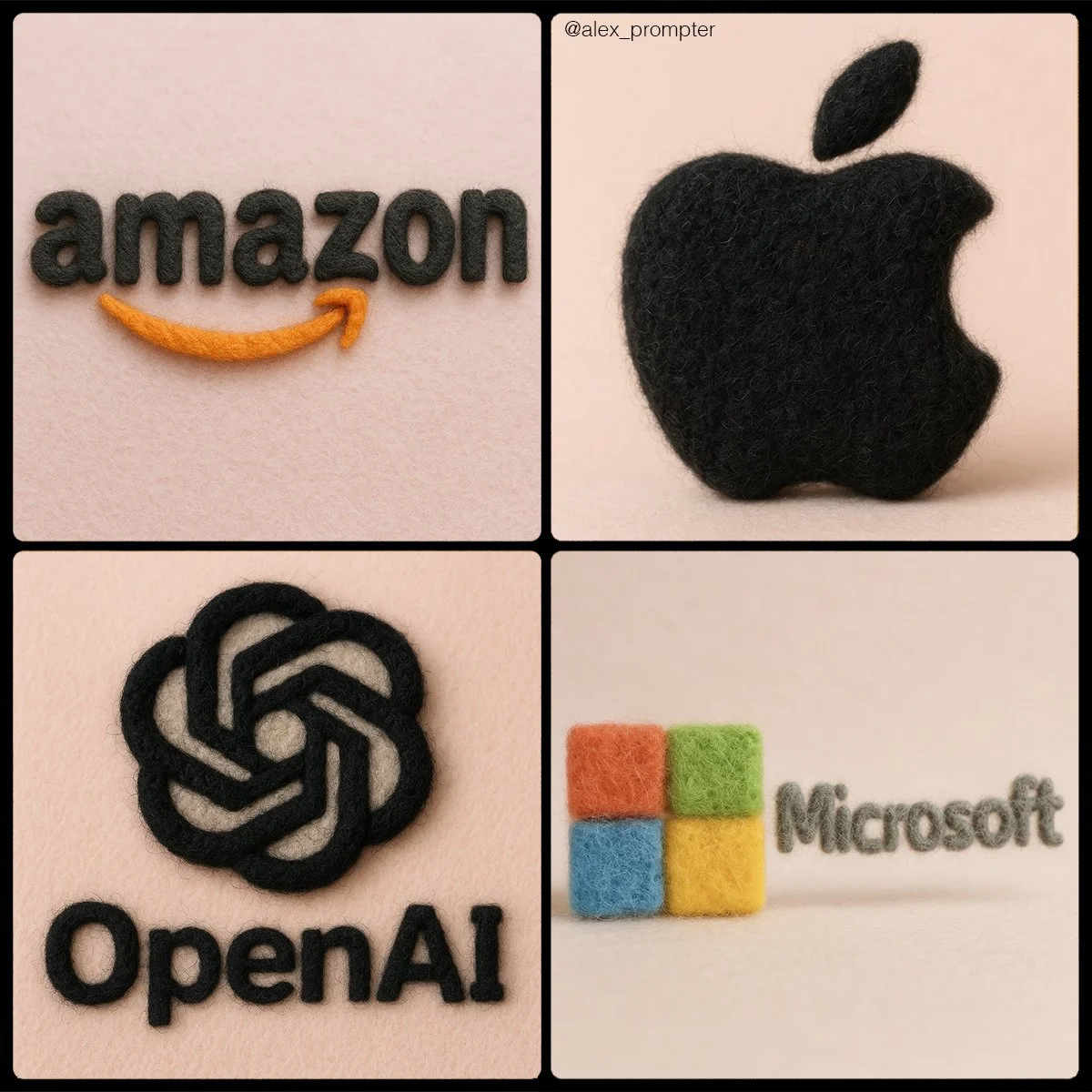
Retexture [BRAND NAME] logo following my JSON aesthetic below: { "style": "realistic needle-felted wool sculpture", "subject_handling": { "adapt_to_uploaded_image": true, "preserve_original_shape_and_layout": true, "preserve_uploaded_color_values": true, "preserve_text_if_present": true, "preserve_text_case": true, "preserve_exact_letterforms": true, "use_uploaded_image_as_pixel_map": true, "prevent_color_estimation_or_stylization": true }, "needle_felting": { "material_type": "dyed wool fibers matched precisely to uploaded image pixels", "texture_description": "fluffy soft felt with clear fiber strands", "construction_style": "needle-felted, light irregularities allowed but no color bleeding", "color_application_method": "direct color transfer from uploaded image to wool sculpture", "prevent_auto_saturation_adjustment": true, "prevent_color_fading": true, "color_binding_mode": "pixel-level color fidelity per original image" }, "lighting": { "lighting_type": "neutral soft studio lighting", "shadow": "soft, gray-toned shadows under the object only", "highlight_behavior": "matte highlights only from felt surface — no bloom or color shift" }, "background": { "type": "plain matte studio", "background_color": "pastel tone that contrasts with logo color", "color_conflict_handling": "auto-adjust background brightness — do not alter logo colors" }, "camera": { "focus_style": "macro lens", "depth_of_field": "shallow — full subject in sharp detail, soft background", "angle": "frontal or slightly elevated, full subject visible" }, "post_processing": { "color_preservation_enforced": true, "disable_auto-enhancement_or_tinting": true, "no artistic reinterpretation": true, "no auto-correction, bloom, or white balance adjustments": true }, "image_constraints": { "transparent_background": false, "aspect_ratio_locked": true, "include_text_if_present": true, "preserve_text_case": true, "preserve_uploaded_color_values": true, "prevent_shape_or_color_change": true, "enforce_exact_pixel_color_match_to_uploaded_image": true }, "notes": "The uploaded image must be converted into a needle-felted wool sculpture using its exact colors and shape. Use pixel-level mapping to apply the uploaded color values to simulated dyed wool fibers. Do not change, brighten, dull, average, or blend colors. Text must remain intact and readable. Background should be soft pastel to contrast the logo — never adjust the logo to fit the scene." }
Retexture [BRAND NAME] logo following my JSON aesthetic below: { "style": "realistic needle-felted wool sculpture", "subject_handling": { "adapt_to_uploaded_image": true, "preserve_original_shape_and_layout": true, "preserve_uploaded_color_values": true, "preserve_text_if_present": true, "preserve_text_case": true, "preserve_exact_letterforms": true, "use_uploaded_image_as_pixel_map": true, "prevent_color_estimation_or_stylization": true }, "needle_felting": { "material_type": "dyed wool fibers matched precisely to uploaded image pixels", "texture_description": "fluffy soft felt with clear fiber strands", "construction_style": "needle-felted, light irregularities allowed but no color bleeding", "color_application_method": "direct color transfer from uploaded image to wool sculpture", "prevent_auto_saturation_adjustment": true, "prevent_color_fading": true, "color_binding_mode": "pixel-level color fidelity per original image" }, "lighting": { "lighting_type": "neutral soft studio lighting", "shadow": "soft, gray-toned shadows under the object only", "highlight_behavior": "matte highlights only from felt surface — no bloom or color shift" }, "background": { "type": "plain matte studio", "background_color": "pastel tone that contrasts with logo color", "color_conflict_handling": "auto-adjust background brightness — do not alter logo colors" }, "camera": { "focus_style": "macro lens", "depth_of_field": "shallow — full subject in sharp detail, soft background", "angle": "frontal or slightly elevated, full subject visible" }, "post_processing": { "color_preservation_enforced": true, "disable_auto-enhancement_or_tinting": true, "no artistic reinterpretation": true, "no auto-correction, bloom, or white balance adjustments": true }, "image_constraints": { "transparent_background": false, "aspect_ratio_locked": true, "include_text_if_present": true, "preserve_text_case": true, "preserve_uploaded_color_values": true, "prevent_shape_or_color_change": true, "enforce_exact_pixel_color_match_to_uploaded_image": true }, "notes": "The uploaded image must be converted into a needle-felted wool sculpture using its exact colors and shape. Use pixel-level mapping to apply the uploaded color values to simulated dyed wool fibers. Do not change, brighten, dull, average, or blend colors. Text must remain intact and readable. Background should be soft pastel to contrast the logo — never adjust the logo to fit the scene." }
Prompt đã xác minh
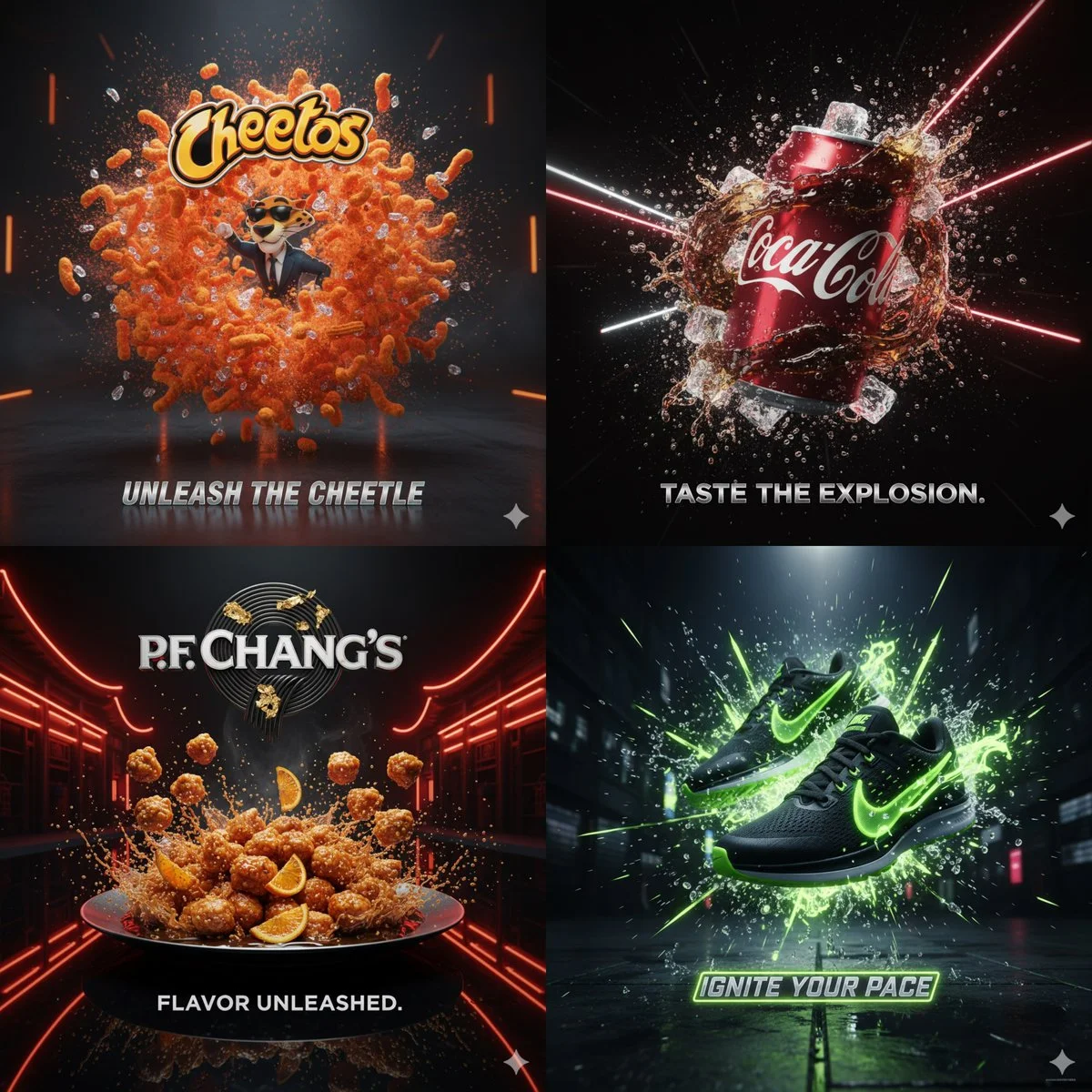
Cinematic 3D action-packed advertisement of [PRODUCT], captured in a dramatic mid-motion scene that embodies its core energy. Use bold studio lighting with intense highlights and deep shadows, dynamic particles, and slow-motion effects to amplify impact. The environment should feel surreal yet hyperrealistic, designed to reflect the product’s personality (crunchy, energetic, fast, luxurious, refreshing, etc.). Integrate the brand logo crafted from product elements if possible, and place a sleek creative slogan beneath it that matches the mood. Composition in 1:1 aspect ratio, hyper-detailed, sharp, bold, and designed to go viral.
Cinematic 3D action-packed advertisement of [PRODUCT], captured in a dramatic mid-motion scene that embodies its core energy. Use bold studio lighting with intense highlights and deep shadows, dynamic particles, and slow-motion effects to amplify impact. The environment should feel surreal yet hyperrealistic, designed to reflect the product’s personality (crunchy, energetic, fast, luxurious, refreshing, etc.). Integrate the brand logo crafted from product elements if possible, and place a sleek creative slogan beneath it that matches the mood. Composition in 1:1 aspect ratio, hyper-detailed, sharp, bold, and designed to go viral.
Prompt đã xác minh
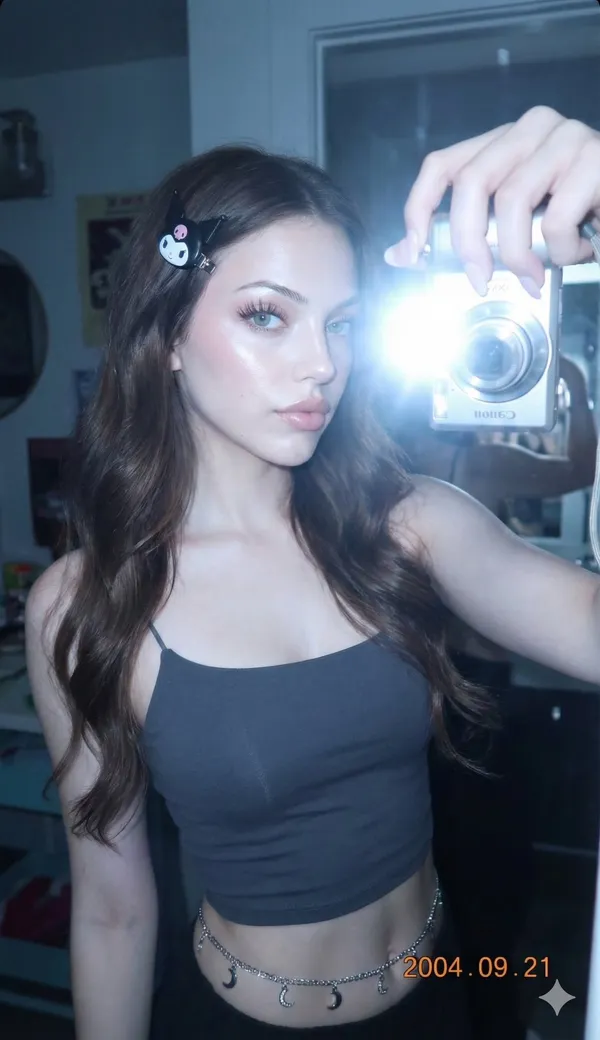
e_generation_request. constraints. preservation_instruction. Please keep my face 100% the same, do not change any facial details.. strictness. }, . Canon IXY/IXUS digital camera. aesthetic_style. Y2K Digital Aesthetic. Cyber Ulzzang. Retro Japan–Korea look. Early 2000s digital photograph. Strong front flash. Directly on face. characteristics. Bright white. effect_on_skin. ,\ . ,\ . \ ] }, . , . Slight cool blue. atmosphere. Mysterious. \ ] } }, . meta_scene_element. A reflection in the mirror shows another woman's hand taking the photo of the model. subject_details. demographics. Teenage girl. physical_appearance. Dark brown. ,\ . ,\ . \ ], . Sanrio Kuromi hair clip. , . Blue-grey contact lenses. , . Slightly pink toned. complexion. ,\ . \ ] }, . Clear, shapely waistline. attire_and_accessories. Dark grey spaghetti strap crop top. Waist belt. Silver chain. Dangling moon charms. Light pink makeup. Long eyelashes. additional_descriptors
e_generation_request. constraints. preservation_instruction. Please keep my face 100% the same, do not change any facial details.. strictness. }, . Canon IXY/IXUS digital camera. aesthetic_style. Y2K Digital Aesthetic. Cyber Ulzzang. Retro Japan–Korea look. Early 2000s digital photograph. Strong front flash. Directly on face. characteristics. Bright white. effect_on_skin. ,\ . ,\ . \ ] }, . , . Slight cool blue. atmosphere. Mysterious. \ ] } }, . meta_scene_element. A reflection in the mirror shows another woman's hand taking the photo of the model. subject_details. demographics. Teenage girl. physical_appearance. Dark brown. ,\ . ,\ . \ ], . Sanrio Kuromi hair clip. , . Blue-grey contact lenses. , . Slightly pink toned. complexion. ,\ . \ ] }, . Clear, shapely waistline. attire_and_accessories. Dark grey spaghetti strap crop top. Waist belt. Silver chain. Dangling moon charms. Light pink makeup. Long eyelashes. additional_descriptors
Prompt đã xác minh
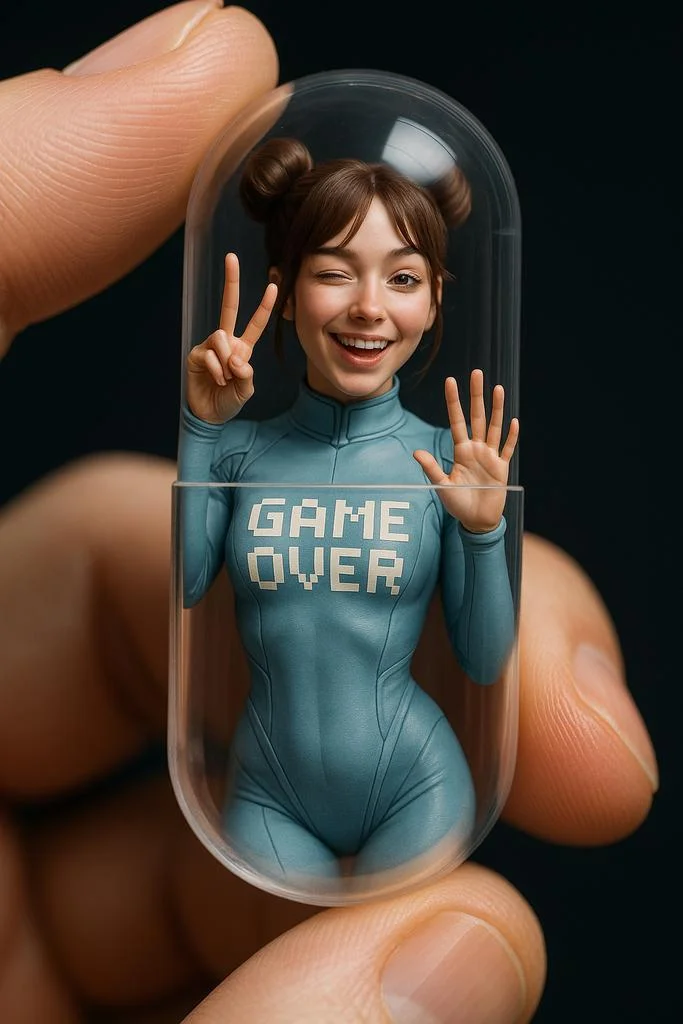
Close-up, A hand holding a transparent capsule, inside it is a miniature model of [character name], wearing [their iconic outfit and accessories]. The character is posed in a [specific, expressive or dynamic pose], interacting with the inner surface of the capsule, as if they are frozen or confined inside. Hyper-realistic, cinematic, studio lighting setup, photographed with a macro lens.
Close-up, A hand holding a transparent capsule, inside it is a miniature model of [character name], wearing [their iconic outfit and accessories]. The character is posed in a [specific, expressive or dynamic pose], interacting with the inner surface of the capsule, as if they are frozen or confined inside. Hyper-realistic, cinematic, studio lighting setup, photographed with a macro lens.
Prompt đã xác minh
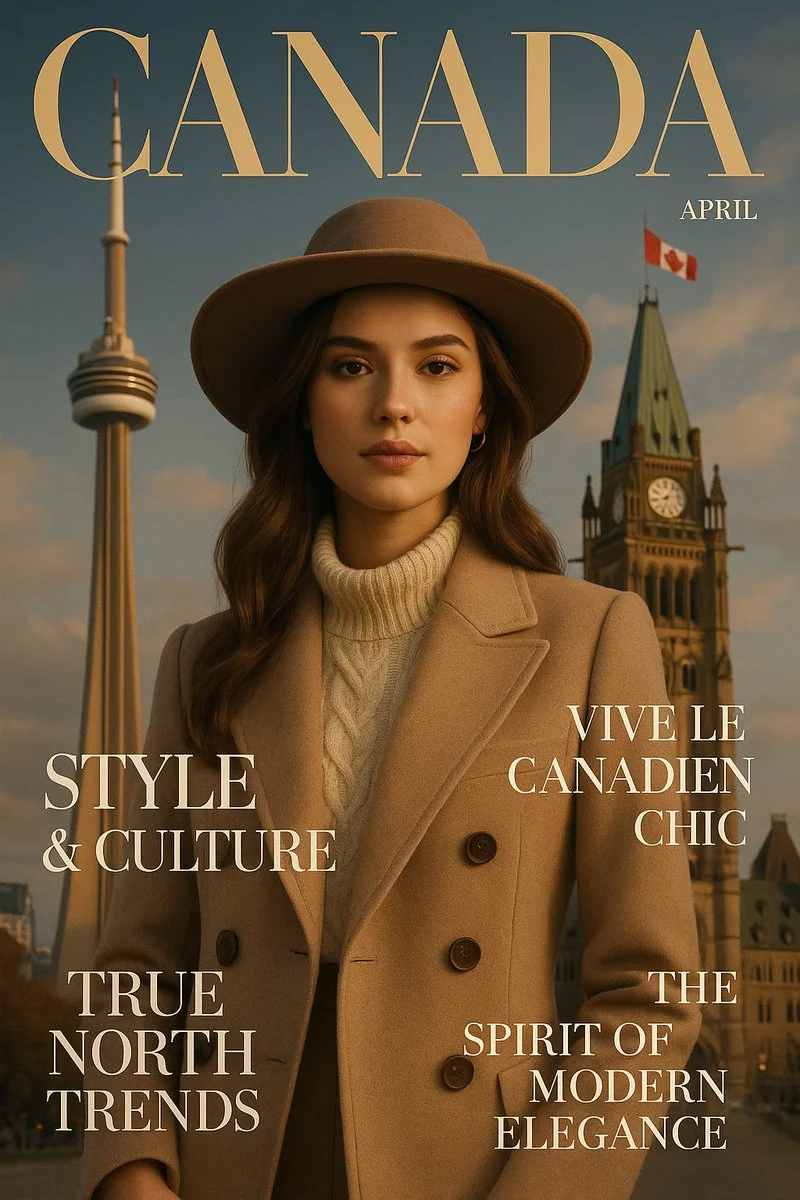
a luxurious fashion magazine cover designed in the style of [COUNTRY], blending iconic landmarks, cultural symbols, and local fashion aesthetics. The layout mimics high-end editorial design, with headlines inspired by the country’s language, trends, and lifestyle. Sophisticated, cinematic lighting, vertical 9:16 format, ultra-detailed, Vogue-level elegance
a luxurious fashion magazine cover designed in the style of [COUNTRY], blending iconic landmarks, cultural symbols, and local fashion aesthetics. The layout mimics high-end editorial design, with headlines inspired by the country’s language, trends, and lifestyle. Sophisticated, cinematic lighting, vertical 9:16 format, ultra-detailed, Vogue-level elegance
Prompt đã xác minh
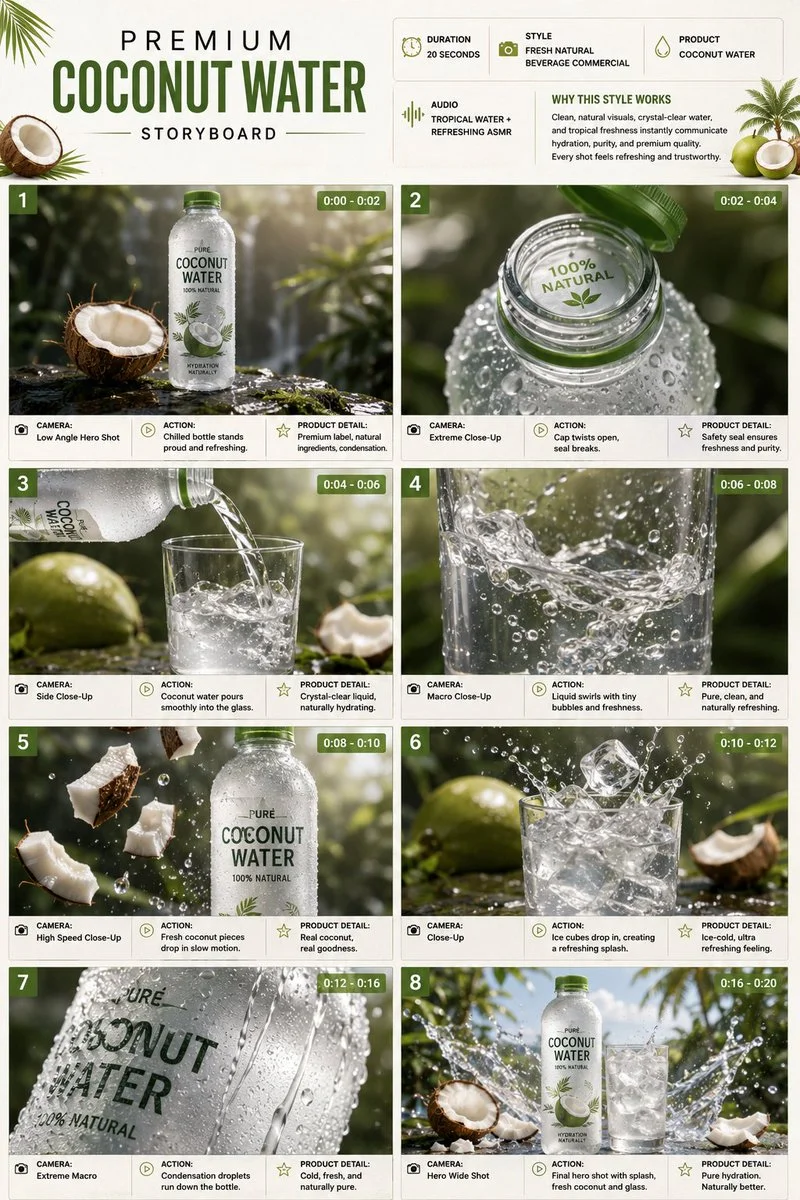
Design a single-page premium 3:4 portrait storyboard for a twenty-second coconut-water commercial. Header with duration, fresh-natural beverage style, product name, tropical water ASMR audio, and a why-this-works note in white, coconut-green, and beige. Eight cinematic product scenes: a chilled bottle on wet stone with condensation; the cap opening; a pour into a glass; liquid swirling with tiny bubbles; coconut pieces dropping in slow motion; ice cubes creating a controlled splash; extreme-macro condensation droplets; a final hero bottle and glass with a frozen splash. Each panel includes scene number, duration badge, camera direction, visual, action, and product detail. Ultra-realistic beverage advertising, high-speed liquid photography, 8K, product remains the hero.
Design a single-page premium 3:4 portrait storyboard for a twenty-second coconut-water commercial. Header with duration, fresh-natural beverage style, product name, tropical water ASMR audio, and a why-this-works note in white, coconut-green, and beige. Eight cinematic product scenes: a chilled bottle on wet stone with condensation; the cap opening; a pour into a glass; liquid swirling with tiny bubbles; coconut pieces dropping in slow motion; ice cubes creating a controlled splash; extreme-macro condensation droplets; a final hero bottle and glass with a frozen splash. Each panel includes scene number, duration badge, camera direction, visual, action, and product detail. Ultra-realistic beverage advertising, high-speed liquid photography, 8K, product remains the hero.
Prompt đã xác minh
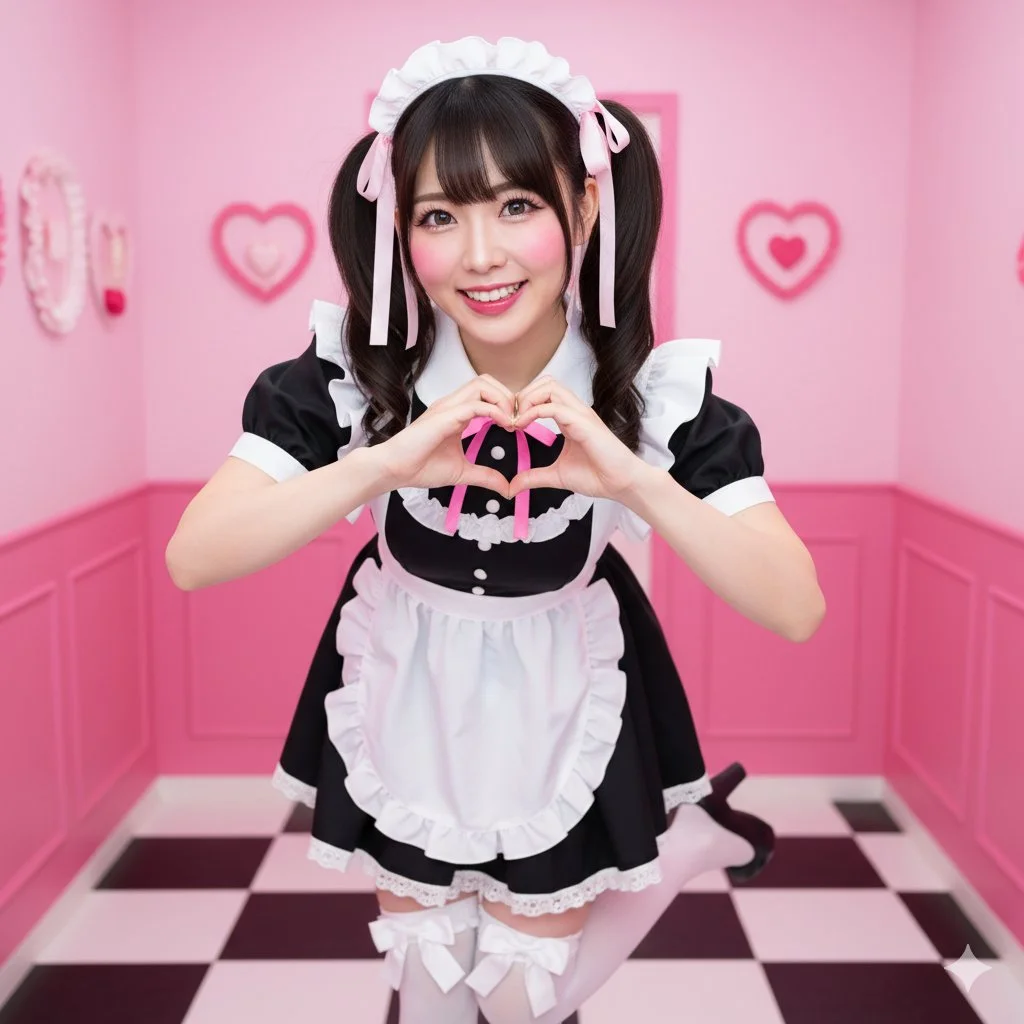
{ "scene": { "location": "Themed 'Maid Cafe' interior, focused and clean", "background": "Bright pink walls, checkered floor, subtle hearts and ruffle decorations (soft focus, no distracting elements)" }, "subject": { "age": "adult", "description": "Realistic East Asian woman, dark hair in high twin-tails with ribbons, sparkling, energetic eyes", "wardrobe": "Classic black maid dress with a short skirt, pristine white frilly apron, knee-high white socks with bows", "accessories": "Frilly maid headband, ribbons in hair", "pose": "Full body, dynamic 'moe moe kyun' pose; both hands making a heart gesture, one foot popped, slight bow", "expression": "Extremely energetic, wide-eyed 'kawaii' smile, 'genki' (energetic) personality", "gaze": "Direct to camera, engaging and cheerful", "body_notes": "realistic adult proportions; natural skin texture" }, "camera": { "sensor": "full_frame", "focal_length_mm": 35, "aperture_f": 2.8, "shutter_s": 0.008, "iso": 400, "white_balance_k": 5000, "distance_m": 3.0, "camera_height_m": 1.0, "framing": "Full body shot, slightly low angle to enhance cuteness and energy", "focus": "eye_detect_AF on nearest eye" }, "lighting": { "key": "Bright, even, slightly flat studio lighting (simulating cafe interior)", "fill": "Large softboxes from both sides to eliminate shadows", "hair": "Top-down rim light to separate hair", "catchlights": "Multiple, large, bright catchlights", "notes": "Very bright, 'pop' lighting, high-key" }, "color_grade": { "style": "Akihabara-pop, vibrant", "palette": "Bright pink, black, white; clear, bright skin", "contrast": "Medium, very clean and crisp", "saturation": "High saturation" }, "makeup": { "eyes": "Emphasized 'anime' eyes, prominent aegyo-sal, long upper and lower lashes", "cheeks": "Bright pink, circular blush", "lips": "High-gloss pink or red lip tint" }, "postprocess": { "retouch": "Clean skin retouching, "idol" level", "clarity": "High clarity on eyes, apron ruffles, and hair", "dodge_burn": "Dodge on eyes to make them sparkle", "vignette": "None" }, "art_direction": { "mood": "Energetic, cheerful, adorable, welcoming", "keywords": ["maid cafe", "moe", "kawaii", "twin-tails", "heart gesture", "Akihabara"] }, "negative_prompts": [ "nsfw", "underage look", "text or logos", "plastic doll skin", "warped hands or extra fingers", "deformed limbs", "dark or moody", "French maid (Victorian)", "sad expression", "cluttered background", "photography equipment", "lighting equipment" ] }
{ "scene": { "location": "Themed 'Maid Cafe' interior, focused and clean", "background": "Bright pink walls, checkered floor, subtle hearts and ruffle decorations (soft focus, no distracting elements)" }, "subject": { "age": "adult", "description": "Realistic East Asian woman, dark hair in high twin-tails with ribbons, sparkling, energetic eyes", "wardrobe": "Classic black maid dress with a short skirt, pristine white frilly apron, knee-high white socks with bows", "accessories": "Frilly maid headband, ribbons in hair", "pose": "Full body, dynamic 'moe moe kyun' pose; both hands making a heart gesture, one foot popped, slight bow", "expression": "Extremely energetic, wide-eyed 'kawaii' smile, 'genki' (energetic) personality", "gaze": "Direct to camera, engaging and cheerful", "body_notes": "realistic adult proportions; natural skin texture" }, "camera": { "sensor": "full_frame", "focal_length_mm": 35, "aperture_f": 2.8, "shutter_s": 0.008, "iso": 400, "white_balance_k": 5000, "distance_m": 3.0, "camera_height_m": 1.0, "framing": "Full body shot, slightly low angle to enhance cuteness and energy", "focus": "eye_detect_AF on nearest eye" }, "lighting": { "key": "Bright, even, slightly flat studio lighting (simulating cafe interior)", "fill": "Large softboxes from both sides to eliminate shadows", "hair": "Top-down rim light to separate hair", "catchlights": "Multiple, large, bright catchlights", "notes": "Very bright, 'pop' lighting, high-key" }, "color_grade": { "style": "Akihabara-pop, vibrant", "palette": "Bright pink, black, white; clear, bright skin", "contrast": "Medium, very clean and crisp", "saturation": "High saturation" }, "makeup": { "eyes": "Emphasized 'anime' eyes, prominent aegyo-sal, long upper and lower lashes", "cheeks": "Bright pink, circular blush", "lips": "High-gloss pink or red lip tint" }, "postprocess": { "retouch": "Clean skin retouching, "idol" level", "clarity": "High clarity on eyes, apron ruffles, and hair", "dodge_burn": "Dodge on eyes to make them sparkle", "vignette": "None" }, "art_direction": { "mood": "Energetic, cheerful, adorable, welcoming", "keywords": ["maid cafe", "moe", "kawaii", "twin-tails", "heart gesture", "Akihabara"] }, "negative_prompts": [ "nsfw", "underage look", "text or logos", "plastic doll skin", "warped hands or extra fingers", "deformed limbs", "dark or moody", "French maid (Victorian)", "sad expression", "cluttered background", "photography equipment", "lighting equipment" ] }
Prompt đã xác minh
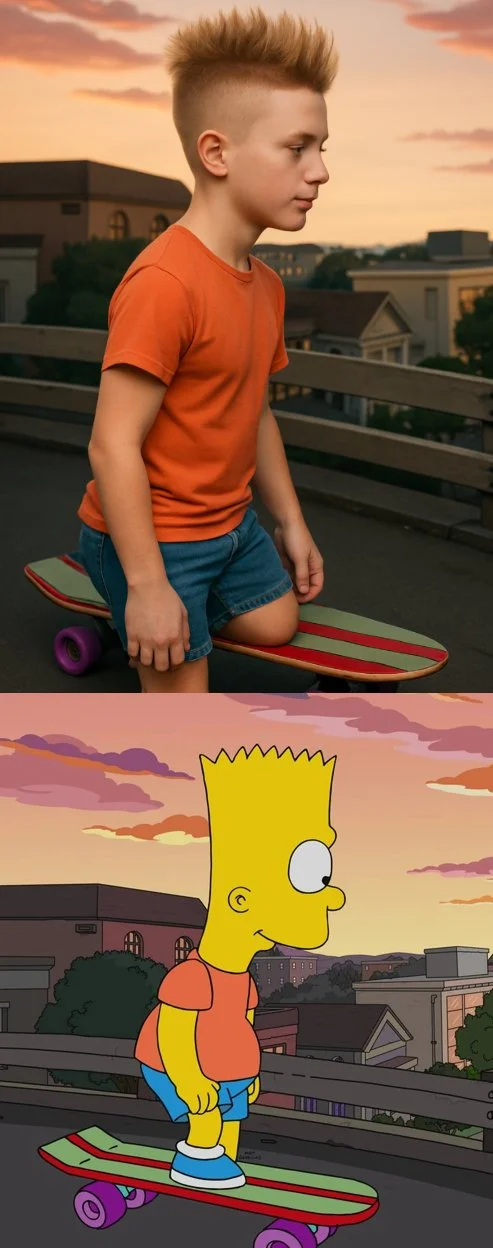
Transform the cartoon character from the reference image into a hyper-realistic human while maintaining their core attributes (clothing, hairstyle, facial expression, accessories, and proportions, age and so on). Create a photorealistic portrait
Transform the cartoon character from the reference image into a hyper-realistic human while maintaining their core attributes (clothing, hairstyle, facial expression, accessories, and proportions, age and so on). Create a photorealistic portrait
Khám phá quy trình tạo hình ảnh
Bắt đầu với bản tóm tắt thị giác, chỉnh sửa ảnh bằng mô hình được hỗ trợ, hoặc duyệt Thư viện lời nhắc để lấy ý tưởng.

Không gian làm việc hình ảnh cho bản tóm tắt sáng tạo tiếp theo của bạn
Flux 3 Image mang tính năng tạo hình ảnh, chỉnh sửa ảnh được hỗ trợ và ví dụ lời nhắc vào một không gian sáng tạo cho nhà thiết kế, nhóm thương mại điện tử và nhà tiếp thị.
Mô tả chủ thể, bố cục, ánh sáng và phong cách. Chọn mô hình khả dụng, xem chi phí tín dụng và kiểm tra kết quả trong Lịch sử.
Tạo một hình ảnhBốn cách định hình một ý tưởng thị giác

Hình ảnh chiến dịch với bố cục rõ ràng
Nghiên cứu áp phích lễ hội về cách sắp xếp hình ảnh, màu sắc và chữ. Với chiến dịch của riêng bạn, hãy xác định điểm nhấn và chừa chỗ cho nội dung cuối. Ví dụ nguồn: Black Forest Labs; hình ảnh này không được tạo trên trang này.
Quy trình thực tế để tạo và chỉnh sửa hình ảnh
Xây dựng một bản mô tả hình ảnh tập trung và sử dụng các điều khiển mà mô hình đã chọn cung cấp. So sánh hình ảnh hoàn thành với bố cục dự định trước khi quyết định thay đổi điều gì.
Mô tả hình ảnh bạn muốn
Bắt đầu với chủ thể, bối cảnh, ánh sáng, góc nhìn máy ảnh và phong cách. Thêm hướng dẫn bố cục cho cảnh sản phẩm, poster hoặc hình ảnh biên tập khi chúng quan trọng.

Mang theo hình tham chiếu khi được hỗ trợ
Chọn mô hình có khả năng chỉnh sửa và tải lên hình tham chiếu mà bạn có quyền sử dụng. Các loại tệp được chấp nhận, giới hạn tham chiếu và điều khiển chỉnh sửa được hiển thị trong trình tạo.

Xem lại cài đặt và chi phí tín dụng
Chọn tỷ lệ khung hình và độ phân giải khả dụng. Xem lại số tín dụng cần thiết trước khi gửi; cài đặt và chi phí được hỗ trợ khác nhau tùy theo mô hình.
Khám phá ý tưởng gợi ý và ví dụ đã công bố
Duyệt các trường hợp đã công bố trong Thư viện gợi ý. Mỗi trường hợp hiển thị mô hình và gợi ý thực tế để bạn có thể nghiên cứu kết quả trong ngữ cảnh.
Mô tả, tạo, xem lại và tinh chỉnh
Đi từ bản mô tả tập trung đến kết quả đã được xem xét. Lưu các phiên bản hữu ích trong Lịch sử và điều chỉnh từng hướng dẫn một.
Mô tả bản tóm tắt hình ảnh của bạn
Viết chủ thể, bối cảnh, bố cục, ánh sáng và phong cách. Đối với việc chỉnh sửa, hãy mô tả thay đổi và các chi tiết bạn muốn giữ lại.
Chọn mô hình và tạo
Chọn từ các mô hình hình ảnh khả dụng, chọn cài đặt được hỗ trợ và xem lại số tín dụng cần thiết. Thêm hình tham chiếu khi mô hình hỗ trợ chỉnh sửa hình ảnh.
Xem lại và tải xuống hình ảnh của bạn
Kiểm tra hình ảnh hoàn thành trong Lịch sử. Kiểm tra khuôn mặt, văn bản, chi tiết sản phẩm và bố cục tổng thể trước khi tải xuống hoặc công bố.
Tinh chỉnh phiên bản tiếp theo
Thay đổi một phần trong gợi ý của bạn hoặc sử dụng chỉnh sửa hình ảnh được hỗ trợ. So sánh các phiên bản để bạn có thể thấy hướng nào cải thiện bản mô tả của mình.
Ý tưởng hình ảnh cho nhà thiết kế, đội thương mại điện tử và nhà tiếp thị
Biến một ý tưởng hình ảnh cụ thể thành tư liệu cho chiến dịch, ý tưởng sản phẩm, bố cục biên tập hoặc bài trình bày sáng tạo. Xem xét mọi kết quả theo mục đích sử dụng dự định.
Cảnh sản phẩm
Mô tả sản phẩm, môi trường và ánh sáng của nó. Kiểm tra hình dạng, nhãn và chất liệu được tạo so với sản phẩm thật trước khi dùng trong danh sách bán hàng.
Hình ảnh chiến dịch
Xây dựng ý tưởng chiến dịch xoay quanh một thông điệp và một tiêu điểm rõ ràng. Chừa không gian cho kiểu chữ cuối cùng và kiểm tra các tuyên bố quảng cáo trước khi công bố.
Bố cục biên tập
Khám phá cách sắp xếp hình ảnh cho bìa, bài viết hoặc bài trình bày. Chỉ định bố cục và thứ bậc thị giác; kiểm tra riêng mọi văn bản được tạo.
Bài trình bày sáng tạo
Sử dụng một ý tưởng thị giác để truyền đạt định hướng cho nhóm của bạn. So sánh khung hình, bảng màu và ánh sáng giữa các phiên bản.
Bố cục nhân vật
Mô tả nhân vật, trang phục, biểu cảm và môi trường. Việc xử lý tham chiếu và tính nhất quán phụ thuộc vào mô hình và các đầu vào được hỗ trợ.
Chỉnh sửa hình ảnh
Sử dụng mô hình chỉnh sửa được hỗ trợ để thay đổi màu sắc, bối cảnh hoặc chi tiết. Kiểm tra toàn bộ hình ảnh để xem liệu các yếu tố không mong muốn có bị thay đổi không.
Ghi chú sáng tạo cho hình ảnh tiếp theo của bạn
Cho hình ảnh một chủ thể rõ ràng. Mô tả bối cảnh và các chi tiết làm nên nét đặc trưng của bản mô tả.

Flux 3 Image: Câu hỏi và câu trả lời
Menu của trình tạo hiển thị các mô hình hình ảnh hiện có trên trang này, bao gồm các mô hình thuộc dòng FLUX được hỗ trợ. Thương hiệu Flux 3 Image và các ví dụ nguồn BFL nổi bật không có nghĩa là tính năng tạo FLUX.3 được cung cấp. Hãy chọn mô hình thực tế được hiển thị trong menu.
Việc tạo sử dụng tín dụng. Chọn mô hình và cài đặt được hỗ trợ để xem số tín dụng cần thiết trước khi gửi. Truy cập Bảng giá để biết các tùy chọn hàng tháng, hàng năm và một lần.
Sử dụng flux3 image trong trình duyệt trên máy tính để bàn hoặc thiết bị di động để viết gợi ý, thêm hình tham chiếu được hỗ trợ, xem Lịch sử và tải xuống hình ảnh đã hoàn thành.
Mô tả chủ thể, bối cảnh, bố cục, ánh sáng và phong cách. Thêm chi tiết chính xác về chất liệu sản phẩm, trang phục hoặc bố cục khi chúng quan trọng. Đối với chỉnh sửa, hãy mô tả điều gì nên thay đổi.
Gợi ý, hình tham chiếu và kết quả có thể được lưu trữ để xử lý yêu cầu và cung cấp Lịch sử. Liên kết phương tiện công khai có thể được người khác xem và chia sẻ. Đọc Chính sách quyền riêng tư trước khi tải lên tài liệu nhạy cảm.
Mô hình đã chọn quyết định độ phân giải, tỷ lệ khung hình, giới hạn tham chiếu và điều khiển chỉnh sửa mà trình tạo cung cấp. Hãy sử dụng các điều khiển đó; thông số kỹ thuật của một hình ảnh nguồn nổi bật không mô tả mọi mô hình khả dụng.
Chọn mô hình có khả năng chỉnh sửa, tải lên hình ảnh được hỗ trợ mà bạn có quyền sử dụng và mô tả bản chỉnh sửa. Kiểm tra kết quả để xem cả thay đổi bạn yêu cầu lẫn các chi tiết xung quanh.
Xem lại các điều khoản nền tảng và mô hình áp dụng cho mục đích sử dụng dự định của bạn. Bạn chịu trách nhiệm về quyền đối với tài liệu tải lên, người có thể nhận diện, logo và nội dung của bên thứ ba khác.
Thời gian xử lý thay đổi tùy theo mô hình, cài đặt, yêu cầu và tải dịch vụ. Theo dõi trạng thái yêu cầu trong Lịch sử.
Không. flux3 image là không gian làm việc độc lập của bên thứ ba. Hình ảnh nổi bật trên trang chủ được ghi nguồn cho Black Forest Labs và tách biệt với kết quả do người dùng tạo trong Thư viện gợi ý. Gợi ý gốc chỉ được bao gồm khi đã xác minh.
Các bài viết khác
Hướng dẫn tạo hình ảnh
Tạo hình ảnh tiếp theo của bạn
Mô tả ý tưởng của bạn, chọn mô hình hình ảnh khả dụng và xem lại số tín dụng cần thiết. Kiểm tra và tải xuống kết quả đã hoàn thành từ Lịch sử.